![Diane Poremsky [Outlook MVP]](http://www.outlook-tips.net/images/2014/MVP_BlueOnly.png)
A user had this question:
I occasionally need to copy the name, title, company and address of an individual contact to a Word or Excel document. Or in some cases all of the data I have for a contact. Is there a way to do that without copying line by line. It seems like there should be a way to copy and paste all of the data for a contact with a single command – but I have not found it.
While you could use the Insert Address command in Word, its often cumbersome for a single address. Instead, make a view that shows the fields you typically use then select the Contact (or Contacts), copy and paste as text (I use a windows utility call “pure text” to do this rather than using paste special).
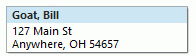 If you use a card view with just the File As, Company, and Address field, the address will be formatted perfectly for envelopes.
Goat, Bill
127 Main St
Anywhere, OH 54657
A tutorial is available at Copy Formatted Address Blocks to Use in Other Programs
To use the Insert Address command in Word, customize the ribbon or QAT to include the Address Book command. (It's under All Commands.)


Need help changing the business card format? See Changing Outlook's Business Card layout for instructions, including a VBA code sample to apply the changes to all contacts. Note: In Outlook 2013, copying the business card includes company name, address and phone numbers, even if not visible in the business card view.
Published December 10, 2009. Last updated on September 4, 2014.