Tip 494: Recurring Appointments

April 9, 2008
By

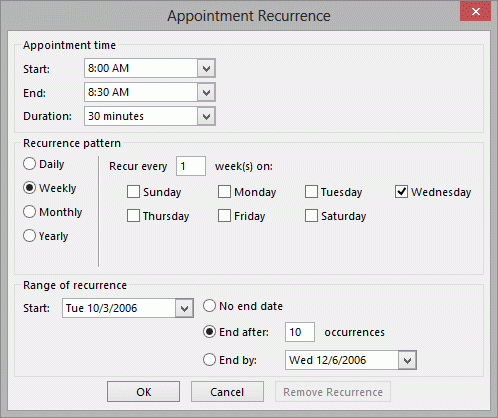
This must be the week for complaining about Outlook’s recurrence patterns. No, Outlook does not offer every 5th week pattern. This is because not every month has a 5th week and Outlook won’t know what to do those months. Instead, it offers a ‘last week’ option. It doesn’t have a quarterly pattern but you can make you own – every 90 days, 13 weeks, or 3 months.

If you need more configurable recurrence patterns, try WS:Repeat Appointment. It can even do recurrences which aren’t patterns.

WS:Repeat Appointment
http://www.websetters.co.uk/ WSAddIns/WSRAII/index.htm

Related posts:

Tip 452: Recurring Appointments
Tip 281: Using the Recurrence Pattern to Filter
Tip 330: Delete Future Recurring Appointments
Tip 377: Viewing 6 Weeks
Tip 463: Another Calendar Printing Bug
« « Tip 493: View Animated GIF
Tip 495: Changing Calendars » »

One Response to Tip 494: Recurring Appointments

  1. Peter S on January 26, 2012 at 12:06 pm

    The explanation for Outlook’s limited behavior, “this is because not every month has a 5th week and Outlook won’t know what to do for those months,” is such a lame excuse. If there is no 5th week, then the appointment shouldn’t exist for that month (but should exist for months that do have 5th weeks). The problem with using “last week” is that, for most months, it will be the 4th week, which is wrong (i.e. not a 5th week).

    This is another classic example of how the programmers at Microsoft seem to live on a different planet. The rest of us have to live in the real world, which does actually have 5th-week days in some months.

Leave a Reply

Your email address will not be published. Required fields are marked *

Connect with Facebook

*


Outlook Daily Tips by Email

*  Your Email Address:

Resources

Ask questions and share your knowledge in Outlook Forums.

More Outlook and Exchange articles available at Outlook and Exchange Solutions Center

Follow me on:

Follow @Outlooktips on Twitter   Join Outlooktips on Facebook