![Diane Poremsky [Outlook MVP]](http://www.outlook-tips.net/images/2014/MVP_BlueOnly.png)
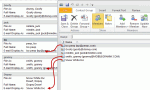
This seems to be the week everyone wants to sort the names in a Contact Group (distribution list) in a specific order, usually last name, first name format and it's not working.Contacts inserted into a Contact Group use the Email Display as format.By default, the Email display as field uses "Full Name (alias@domain.com)" format. But if you change the entry in the … [Read more...] about Tip 1034: Sorting Contact Group members by name
dl
Tip 933: Display the Total Number of Members in a Contact Group
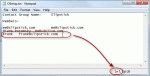
A user wanted to know if Outlook can display the total count of members of a Contact Group (distribution list). Yes, this is possible. Open the Contact Group and click Forward > In Internet Format. This creates a new message with the contents of the DL in a text file. Double click on the attachment (named "group_name.txt") to open the file then go to the View menu, … [Read more...] about Tip 933: Display the Total Number of Members in a Contact Group
How to remove Members from a Contact Group

When you want to remove members from a distribution group, click the Remove Members button, don't use the Delete key or button. If you use the Delete button () you'll delete the entire distribution group. Select the name (or names) and use the Remove Member button instead. (In older versions of Outlook the button name is just "Remove".) If you accidentally delete … [Read more...] about How to remove Members from a Contact Group
Tip 201: Add Addresses to a Distribution List
Do you want to make a Distribution list using a list of addresses found in another file? While the recommended method is to import the addresses to contacts and assign categories so you have an easy to manage dynamic DL, you can easily copy and paste the addresses into a DL form.The addresses need to be in semi-colon delimited format or one address per line.Open a new … [Read more...] about Tip 201: Add Addresses to a Distribution List
Tip 10: Dynamic Distribution Lists

Did you know you can use Categories to create dynamic distribution lists in your Contacts folder?When you need to add or remove names from a group mailing list, you only need to add the category to or remove it from the contacts. When an email address changes, you only need to update their contact form, not the distribution lists they are members of.Send a message or … [Read more...] about Tip 10: Dynamic Distribution Lists