![Diane Poremsky [Outlook MVP]](http://www.outlook-tips.net/images/2014/MVP_BlueOnly.png)
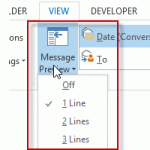
Outlook 2013 makes a change to the 3 line preview feature in older versions: you can choose 1, 2, or 3 line preview and select it from a button on the ribbon for quick changes.I see the new feature where you can set it to preview 1-3 lines of email. But I'd like to have the ability to do what I have always done in Outlook and preview just the Unread Emails. How can I … [Read more...] about Tip 1071: Auto Preview Email in Outlook 2013
messages
Tip 1063: Change the Received date format

There are two types of Outlook users: those who like seeing relative dates and those who don't. Jim doesn't like it:I hate this trend of hiding data, using relative dates, etc. None of it works for me at all. Not just annoying, but reduces my efficiency tremendously.I happen to like it, but anyone who doesn't like it can change the format used in the message list. … [Read more...] about Tip 1063: Change the Received date format
Tip 1059: Change the color of messages in the Inbox
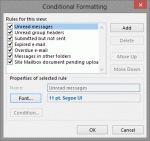
A visitor to OutlookForums wanted to know how to change the colors in Outlook 2013's message list.How do you change the obnoxious color of the email headers on Outlook 2013? The email headers are all this distracting and obnoxious cobalt blue.The message list in Outlook 2010 and older doesn't have "obnoxious colors", but you can change the colors or create new … [Read more...] about Tip 1059: Change the color of messages in the Inbox
Tip 1029: Strange characters in email?

This is a fairly common question, although I see it a lot less these days, thanks to the widespread use of Unicode.Why do we get these characters à replacing text in email messages?This happens most often when you use characters supported by Word's "smart quotes" feature, typically affecting apostrophes, double quotes, dashes, and ellipsis. The character is … [Read more...] about Tip 1029: Strange characters in email?
Tip 996: How to send a forwarded draft message in Outlook
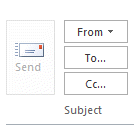
It's a surprisingly common scenario: a user creates a draft message and forwards it to a coworker or manager for approval or additional comments. The message is then supposed to be sent. Except, it can't be sent because the Send button is grayed and disabled. There is no Send button because Outlook doesn't see it as a draft message, it sees it as an attached file. … [Read more...] about Tip 996: How to send a forwarded draft message in Outlook