![Diane Poremsky [Outlook MVP]](http://www.outlook-tips.net/images/2014/MVP_BlueOnly.png)
I'm using MagicJack and it requires that all numbers have an area code, but no +1. I figured out how to require the area code for my home location, but is there a way to eliminate the +1 on all area codes other than setting up area code rule for each area code? Sure.The default setting is no country code is added, so when you type 2025551212 into the number field, the … [Read more...] about Tip 1115: Contact's Phone number formatting
phone numbers
Changing the Default Country for Contacts
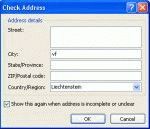
Several users recently asked similar questions. One user wants Outlook to default to Canada when creating new contacts, the other user moved and Outlook is still defaulting to his old country when he creates new contacts. What setting, in what control panel, does Outlook call to default the country when creating a new contact? The default country for my Outlook Contacts is … [Read more...] about Changing the Default Country for Contacts
The Location Information dialog comes up when you enter a phone number
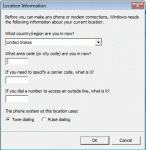
We get a lot of questions about the Location dialog that comes up the first time you enter a phone number in contacts. This is the Windows Phone & Modem dialog and you need to enter your telephone area code and save it before you can enter phone numbers for contacts. Yes, even if you don't have a modem or call contacts from Outlook, you will still need to enter an area code. … [Read more...] about The Location Information dialog comes up when you enter a phone number
Tip 608: More Number Formatting

Update: If you use a 4 or 5 digit area code Outlook will not format the numbers. In the US, any 4 digits will do; if it doesn't work for you, try using 99999.If you are one of the users who doesn’t like how Outlook formats numbers or you sync with a PDA that doesn’t understand formatted phone numbers, you can temporarily stop the formatting by pausing the Telephony … [Read more...] about Tip 608: More Number Formatting