![Diane Poremsky [Outlook MVP]](http://www.outlook-tips.net/images/2014/MVP_BlueOnly.png)

When a copy of Outlook is purchased and installed, some spell check and autocorrect features will not work. This is expected because Word adds the spelling and autocorrect features and its not available when you install only Outlook.However... there is a hack that will restore some or all of the missing features: copy winword.exe into the folder where outlook.exe is, then … [Read more...] about Tip 852: Outlook 'standalone' and Spelling and Auto-Correct not working
spell check
Using Signatures in Outlook 2003 or 2007
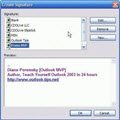
When you use Outlook 2003 and set Word as your email editor or use Outlook 2007, 2010 or 2013, it's easy to change signatures on your messages. If you use multiple email accounts, you can set a signature for each account and it's changed each time you change the account, provided you have a default signature configured for each account. First, create a signature for each … [Read more...] about Using Signatures in Outlook 2003 or 2007
Tip 697: Autocorrect Q & A
Today I’ll answer common autocorrect questions. Q: The program insists on capitalizing the first letter of every line even if not the beginning of a sentence. A: Stop pressing Enter at the end of the line. Outlook is fully capable of wrapping sentences every 76 characters (less if desired – look in Tools, Options, Mail format, Internet Format) and you only need to use … [Read more...] about Tip 697: Autocorrect Q & A
Signature Spell check
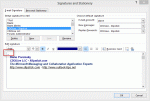
A reader had a problem with their signature:Sometimes Outlook 2007 thinks part of my message is part of my signature and no spelling check is done. How can I tell Outlook to change a section from signature to normal? Right clicking always shows me all my possible signatures and never the spelling mistakes. If I copy and paste, Outlook still thinks it is the signature. I … [Read more...] about Signature Spell check
Tip 379: Office 2007 and OE Spell Check

After a long break to move, the Tips are back! If you install Office 2007, spell checking in Outlook Express may not work as expected, unless you want spell check in French. :) This is because Office 2007 uses new proofing tools and OE can't use them because it's designed to use the older tools. It's easy to fix: install just the proofing tools from your previous version of … [Read more...] about Tip 379: Office 2007 and OE Spell Check