![Diane Poremsky [Outlook MVP]](http://www.outlook-tips.net/images/2014/MVP_BlueOnly.png)
While this is no longer a problem with Paypal, users are reporting similar problems with Google Apps. Paypal fixed the problem on their end, so future messages won't cause Outlook to hang. This fix will not affect existing messages; Outlook will still hang if you try to open them.
Over the last few days, Outlook users with recently active PayPal accounts have experienced issues with Outlook hanging when they view email messages from PayPal. Outlook goes into a not responding state while it tries to process a web bug using a malformed url (missing HTTPS to //102.112.2O7.net/b/ss/paypalglobal/*).
While this old news (and very annoying) to anyone who received messages from PayPal over the last couple of days, my concern is that Outlook is trying to connect to a web address, even though I block all external content.
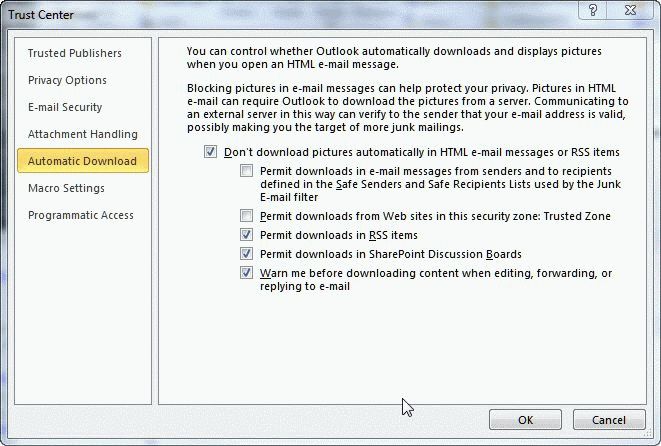
I don't allow any automatic downloads, not even from trusted addresses, but Fiddler shows traffic to 102.112.2O7.net when I select a message that causes Outlook to hang.
Bad Outlook! Don't download external content should mean "don't even try to contact the server".
This bug needs fixed ASAP. It defeats one purpose of blocking web bugs in email and not allowing external content.
If you are affected by the PayPal hang, be patient and wait about a minute or two, and Outlook will display the message. However, every time you select an affected message you need to wait for Outlook to time out. A better solution is to edit the hosts file to point the offending domain to the local host. Outlook will time out faster with this entry in hosts and you will not be sending web bug data back to paypal in the future.
Type Notepad in the Start menu's Search field (or find it on the Start menu). Right click on Notepad and choose Run as Administrator. (You'll need to enter your administrator password in Windows 7 or Vista).
C:WINDOWS\system32\drivers\etc\HOSTS
Type or paste this into the hosts file and save. (That's an o in 2O7, not a zero)
127.0.0.1 102.112.2O7.net
Note: if you don't open Notepad using Run as Administrator, you'll need to save the file to My Documents and copy it to folder. Using Run as Admin is so much easier. :) If you don't see Run as Administrator on the right-click menu of Notepad, hold Shift and right click again.
The messages affected will always be broken – if you need to keep a copy of the message, you should convert it to plain text format or edit the message to remove the web bug (at the very bottom of the message).
More information and workarounds are available at Outlook 2010 hangs while opening messages
Published October 13, 2011. Last updated on October 11, 2012.