![Diane Poremsky [Outlook MVP]](http://www.outlook-tips.net/images/2014/MVP_BlueOnly.png)
Update: If you use a 4 or 5 digit area code Outlook will not format the numbers. In the US, any 4 digits will do; if it doesn't work for you, try using 99999.
If you are one of the users who doesn’t like how Outlook formats numbers or you sync with a PDA that doesn’t understand formatted phone numbers, you can temporarily stop the formatting by pausing the Telephony service. (Control panel, Administrator Tools, Services, double click on Telephony and pause it.)
This Windows service will restart when you reboot, but as long as you don’t edit the number or touch the button that brings up the check number dialog in contacts (labeled Business…, Home… etc) the formatting shouldn’t change.
If you don’t mind the formatting but don’t want the country code (i.e., +1) added to the number, leave the Telephony service enabled and DO NOT click the aforementioned buttons.
If you dial calls from Outlook or use a modem (including a cellular modem), these services will not work while Telephony is disabled. Skype and similar services may work.
After reading the above tip, evpanza had this to say:
“Another option, for those who cannot remove the Telephony service (corporate machines) is to go to Control Panel, Phone & Modem Options and edit the Default Location. Choose the International Freephone Service.”
This is used for 800# and it does not format the number. If you click the number button (Business…, Home… etc) it will add “800+” to the number. This is better and easier than disabling the telephony service.
Thanks evpanza for sharing!
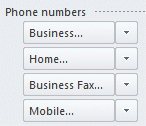
Also you should never click the phone buttons (shown below). Doing so will add the country code to the number, converting it to this format: +1 (234) 567-8901.
If you need to remove the area code and formatting from existing numbers, we have VBA code at Remove Prefix from Phone Number
Published April 11, 2009. Last updated on November 1, 2013.
