![Diane Poremsky [Outlook MVP]](http://www.outlook-tips.net/images/2014/MVP_BlueOnly.png)
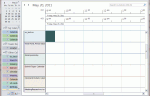
Outlook 2010 has a limit of 30 calendars selected at any one time. If you try to select more than 30, you’ll be alerted: “More than 30 calendars cannot be viewed at once.” It’s surprising to have a limit because Outlook 2010’s Schedule view makes viewing large numbers of calendars much easier – in older versions it was difficult to view more than 13 to 15, even using … [Read more...] about Tip 745: Outlook 2010 and More than 30 Calendars Error
Tip 743: Mark my comments with [Name]
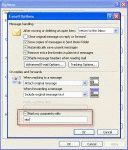
An Outlook user asked: I have no idea what setting I must of hit, but I'm seeing my first name appear in the middle of a sentence with brackets around it, i.e., [name]. It only happens when I'm composing email messages in Outlook. How can I adjust settings to get rid of this nuisance? You should only see this when you reply to messages and type within the … [Read more...] about Tip 743: Mark my comments with [Name]
Tip 742: Outlook 2010 and Shortcuts to Public folders
If you want to use a shortcut to open Outlook to a public folder, you can use the select switch and path to the public folder:Outlook.exe /select "outlook:\\Public Folders\All Public Folders\folder\subfolder"This works great in older versions of Outlook but fails in Outlook 2010 with an error message:Cannot start Microsoft Outlook. Cannot display the selected … [Read more...] about Tip 742: Outlook 2010 and Shortcuts to Public folders
Tip 741: Saving Images
An Outlook user asked about an annoyance: “When are they going to fix the bug that prohibits saving a graphic embedded in an email? Now I have to copy it, paste it into a graphic program and save it that way.” It’s fixed in Outlook 2010, but that won’t help anyone with older versions of Outlook. You can use File, Save as to save the entire message in HTML format. This … [Read more...] about Tip 741: Saving Images
Tip 739: Hotfix: Windows Mobile and 12 year Recurrence Issue
Last fall I mentioned a problem Windows mobile users had when syncing birthdays after installing Office 2007 SP2, where they birthdays changed to recur every 12 years. This is now fixed:Description of the Office Outlook 2007 hotfix package (outlook-x-none.msp): April 27, 2010//support2.microsoft.com/kb/981048 This hotfix covers a lot more than just this bug – including a … [Read more...] about Tip 739: Hotfix: Windows Mobile and 12 year Recurrence Issue