![Diane Poremsky [Outlook MVP]](http://www.outlook-tips.net/images/2014/MVP_BlueOnly.png)
For step by step instructions and a video tutorial, see Moving Outlook to a New Computer Upgrading to a new computer often causes headaches for users. While I have several pages with instructions on both slipstick.com and outlook-tips.net, its spread over several pages. I now have step by step instructions for users moving Outlook data to an new computer – all on one page. … [Read more...] about Tip 698: Moving Outlook to a New Computer
Tip 697: Autocorrect Q & A
Today I’ll answer common autocorrect questions. Q: The program insists on capitalizing the first letter of every line even if not the beginning of a sentence. A: Stop pressing Enter at the end of the line. Outlook is fully capable of wrapping sentences every 76 characters (less if desired – look in Tools, Options, Mail format, Internet Format) and you only need to use … [Read more...] about Tip 697: Autocorrect Q & A
Tip 696: Windows 7 and Go, News
The Go, News command which opened the “Outlook Newsreader” (really Outlook Express in news-only mode) was removed from the Go menu beginning with Outlook 2003. Users who prefer opening Outlook Express or Vista Mail using this command can customize the toolbar to restore it. However, the command is missing when Outlook is installed on windows 7. Because Windows 7 does not … [Read more...] about Tip 696: Windows 7 and Go, News
Tip 695: Not enough weeks this month
A common problem with Outlook’s calendar: “Jan 2010 spans 6 weeks but there is not sufficient room to display the appointments. If I view Dec 2009 and use the scroll bar at the left of calendar I can see 5 weeks at a time.” Questions like this come up a lot and I think I put out a tip each time a month covers 6 weeks. Your January covers 6 weeks because you have … [Read more...] about Tip 695: Not enough weeks this month
Tip 694: Week numbering
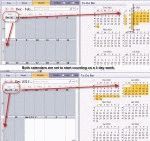
The first week of the new year often brings questions about which week should be the first official week of the year. In Outlook there are 3 options - start on Jan 1, on the first full week, or the first 4 day week. Choosing the 4 day option is probably the most common and is true to ISO standards, although choosing other than Sunday or Monday for the first day of week … [Read more...] about Tip 694: Week numbering