![Diane Poremsky [Outlook MVP]](http://www.outlook-tips.net/images/2014/MVP_BlueOnly.png)
It’s the time of year when many people get new computers and wonder about the legalities of installing their existing software on the new system.“Can I legally install my Office 2007 on my new laptop too in addition to the installation that I already have in my PC? Does the operating system on each computer affect the answer?”In most cases, you are permitted to install two … [Read more...] about Tip 693: Outlook on a new computer
Tip 692: Office Online calendar publishing workaround
While we wait for the publishing problems at Office Online to be fixed, try this workaround – it finally worked for me after several tries. Go to office.com and sign in with the same Live ID you use to publish your calendar and select "Save my e-mail address and password". Restart Outlook and the browser. It should now work for either publishing or updating a subscribed … [Read more...] about Tip 692: Office Online calendar publishing workaround
Tip 691: Hotmail passwords
As mentioned yesterday, calendar publishing is having problems and asking for passwords frequently. We know the cause of the calendar problem is a buggy server. But what about all of the other times Outlook can’t seem to remember the Live password? I know from experience if the Internet connection is bad and Outlook can’t reach the mail server, it will ask for the … [Read more...] about Tip 691: Hotmail passwords
Tip 690: Live calendar password
There is a problem with Live calendar publishing – it keeps asking for the Live ID password over and over. This is not a problem on your end and republishing the calendar will not stop the password dialog. There is something wrong with the publishing server or LiveID. Unfortunately, the only way to get rid of the annoying prompt (before its fixed) is to stop … [Read more...] about Tip 690: Live calendar password
Tip 689: Automatic Underlines
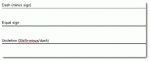
This is really a Word problem and since Word is also the Outlook email editor, I’ll mention this handy (and sometimes annoying) feature. A user asked: "When typing ==== then hitting return, Outlook puts in a double line. This line cannot be selected, formatted, or deleted. Turning borders off moves the line. Selecting all text before and after and hitting delete moves the … [Read more...] about Tip 689: Automatic Underlines