![Diane Poremsky [Outlook MVP]](http://www.outlook-tips.net/images/2014/MVP_BlueOnly.png)
A problem arises when I attempt to change the date of a recurring appointment from, say 25th to 26th of each month. I’m unable to find a place where I can edit the actual ‘date or time’ of the appointment. If you are changing just one occurrence, use a day or week view and drag the occurrence to a new time or date and time. A warning message will come up, telling you the date … [Read more...] about Changing the date of a recurring appointment
Tip 1134: Find the Email Address Properties dialog in Outlook 2013
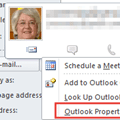
In older versions of Outlook, you could click on a Contact’s email address to bring up a dialog that allowed you to always use Rich Text format, Plain Text format, or to let Outlook decide the best format when sending email or meeting and task requests to the address.In really old versions Outlook, double clicking on an email address brought up the dialog, while in … [Read more...] about Tip 1134: Find the Email Address Properties dialog in Outlook 2013
Tip 1133: How to export 6 months of email to a PST file
This question came from an Exchange administrator but a filtered export is possible in with all email account types and all versions of Outlook. Is there a way in Outlook 2013 to export only the last 6 months’ worth of mail? We are on a hosted Exchange solution with Office 365. Yes, there is a way to do this in Outlook. Outlook uses the same filter dialog for … [Read more...] about Tip 1133: How to export 6 months of email to a PST file
Tip 1132: Convert Outlook Account from POP3 to IMAP
An Outlook user had this question:I'm trying to change my POP3 account to IMAP. How do I do it? Can you please walk me step by step on setting up the IMAP?I sure can. When you switch from POP3 to IMAP, you need to add the account to your profile as an IMAP account; you can't change the configuration for the account you have in your profile.Step 1: In Outlook 2010 … [Read more...] about Tip 1132: Convert Outlook Account from POP3 to IMAP
Tip 1131: Find IMAP Account Sent Items in Outlook
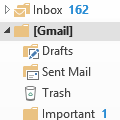
One of the most frequently asked Outlook questions is where the Sent folder is in a Gmail IMAP account:Where are my Gmail IMAP sent items?Click on the small white triangle next to the [Gmail] folder. You’ll find the Sent Mail, Drafts, and Trash folders under the [Gmail] folder. Outlook 2013 will use the Sent Mail, Drafts, and Trash folder. (Outlook 2010 can be … [Read more...] about Tip 1131: Find IMAP Account Sent Items in Outlook