![Diane Poremsky [Outlook MVP]](http://www.outlook-tips.net/images/2014/MVP_BlueOnly.png)

Following last week’s Office 2013’s updates, users began complaining that the Outlook icon on their Windows 8 Start screen was blank. With a little tweaking, the label "Outlook 2013" returned, but the Outlook icon remained missing.This is caused, in part, by the update in KB 2863911. To fix it, you can uninstall the update... or better yet, install SP1.Lync users who … [Read more...] about Tip 1130: Outlook 2013’s Tile is a solid blue square
Tip 1129: Fix Send to Mail Recipient in Windows Explorer
Yes, I've been terribly remiss in not doing tips over the last few months. My New Years Resolutions were simple: get back on track with the Tips and get my hair cut the first of every month. I broke both resolutions by the end of the first week. It was cold and snowy and easy to skip the hair cut, but that excuse won't fly for Tips. :)I received a "cold call" email from a … [Read more...] about Tip 1129: Fix Send to Mail Recipient in Windows Explorer
Tip 1128: Outlook 2013 and the Sync Slider
I receive a few question each month asking about older email that is missing, or unexpectedly small ost files.In order to accommodate SSD drives, which tend to be smaller, Outlook 2013 can be configured to sync only newer messages, leaving the older messages online. This is great for tablets and ultrabook laptops but leads to confusion when the user isn't familiar with … [Read more...] about Tip 1128: Outlook 2013 and the Sync Slider
Tip 1127: How to view only Contact Groups in Outlook
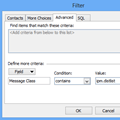
An Outlook user asked the following question. Although he is asking specifically about Outlook 2010, the method is the same in all versions of Outlook even though the menus are different.How can I view my Contact Groups together in Outlook 2010, separately from the individual contacts?To view only Contact Groups (aka Distribution Lists, in older versions) in your … [Read more...] about Tip 1127: How to view only Contact Groups in Outlook
Tip 1126: Copy and paste Appointments into new time slots
This question came from an Outlook user who recently upgraded to Outlook 2013:In Outlook 2013, I create an appointment on a specific day with a specific start and end time, set a reminder, etc. and Save it. When I go to the month view, I can click on the appointment to select it, then type Ctrl+C to copy it. I select another date and paste it using Ctrl+V. Except it … [Read more...] about Tip 1126: Copy and paste Appointments into new time slots