![Diane Poremsky [Outlook MVP]](http://www.outlook-tips.net/images/2014/MVP_BlueOnly.png)
Do you need a list of Outlook items in another format? You can use File, Export, or you can create a custom view, showing just the fields and items you need. Select one item, press Ctrl+A to select all, then Ctrl+C to copy and paste them into another program. You may need to use Paste Special, As Text or first paste into Notepad and copy when pasting into an OLE capable … [Read more...] about Tip 254: Copying (and Pasting) Lists
Tip 253: Identifying Quick Flags
Outlook 2003's Quick flags help you to categorize your messages, but Outlook does not allow you to rename the flags and remembering that a red flag means Very Important, blue means Project A and green is Project B is sometimes hard. To make it easier, create a new custom toolbar called Flags and add each flag color (and Clear flag) to it. Edit the properties of each button to … [Read more...] about Tip 253: Identifying Quick Flags
Tip 252: Saving a PST to CD
After replacing two servers last week, I think I'm caught up on my work that'll I'll be able to get back on track with 3 tips each week. I hope.If not, just call me Slacker. :) When you burn a pst to a CDR, Outlook can't read it directly from the CDR because it needs read/write access to the pst, even if you are only going to read, not change, any items in the pst. You will … [Read more...] about Tip 252: Saving a PST to CD
Understanding Autosignatures in Outlook
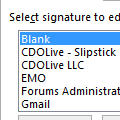
We’ve had a few people complain that Outlook’s signature switching feature broken so I figured it was time for a refresher course on how it works."I created an email signature and want it to show up automatically. I followed the instructions, and it still will not show up on the email. I have shut down and re-opened Outlook and still nothing."If you are using Outlook … [Read more...] about Understanding Autosignatures in Outlook
Tip 250: Viewing long folder names
Outlook 2003 doesn't have a horizontal scroll bar on the Navigation panes, which means if you have long folder names, you'll need to adjust the width of the Navigation pane if you want to view the full name. Instead of changing the Navigation pane width, you can hover the mouse over a folder and see the full name and message count in the screentip. If you just can't get … [Read more...] about Tip 250: Viewing long folder names