![Diane Poremsky [Outlook MVP]](http://www.outlook-tips.net/images/2014/MVP_BlueOnly.png)
Do you need to send your calendar to someone who uses Outlook or another calendar program that supports iCals? Select the appointments you need to send to someone and choose Actions, Forward as iCal. The recipient can save them and use import or just drag them off the message and drop them into the Calendar folder. … [Read more...] about Tip 175: Forward as iCal
Tip 173: Print a Full Month Calendar
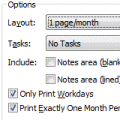
When you try to print a month that covers 6 weeks (such as October 2004), you need to use the Print Options Page Setup option of Print exactly one month per page in order for the full month to print when you include weekends.As an alternative to Outlook's calendar printout, you can use a Word template. Look for links to templates at Calendar Tools for Outlook. … [Read more...] about Tip 173: Print a Full Month Calendar
Tip 172: Right Click Everywhere
Are you a habitual right clicker? Even if you never use the right click menu, its fun to click around and see what is available and where. The options you'll discover are repeated elsewhere but some are fewer clicks away on the right click context menu. Right click on Outlook 2003's group headers to Collapse All or Expand All. Right click on the Day planner's time scale … [Read more...] about Tip 172: Right Click Everywhere
Tip 171: Selecting Calendar Dates
You can hold Shift or Ctrl and select days or weeks in the navigation calendars to control how many days are shown. It works with any of the Day/Week/Month views but you are limited to 14 days or 5 weeks total, depending on your view. … [Read more...] about Tip 171: Selecting Calendar Dates
Tip 170: Run Rules Now
How many times have we heard a story that begins like this: "I store mail in my deleted folder and now.... " The most recent one goes on to say "I now have a lot of junk I don't want and mail I do need. How can I filter out the junk?" Even though the Deleted Items folder is not a place you should store your good mail in, not all is totally lost. I'm not aware of any … [Read more...] about Tip 170: Run Rules Now