![Diane Poremsky [Outlook MVP]](http://www.outlook-tips.net/images/2014/MVP_BlueOnly.png)
All versions of Outlook support Auto-resolve. Also known as automatic name checking, this feature allows you to type a name, or even just the first few letters, and the name resolves a few seconds after you tab out of the field. When one match is found, the name has a solid underline. When more than one possible match exist you’ll see a red wavy underline. Right click on it to … [Read more...] about Tip 99: What is Auto-Resolve and Auto-Complete?
Tip 98: PocketKnife Peek
One of the best freeware utilities available for Outlook has just gotten better. PocketKnife Peek makes it easy to view message headers and source. It now supports reply in plain text and view attachment information, including names (with extra spaces removed) and file sizes of attachments sent in zips. Other features of PocketKnife Peek include Reply to some, which presents … [Read more...] about Tip 98: PocketKnife Peek
Tip 97: Using Custom Views
Did you know you aren't limited to using specific view formats on specific folders? Yes, you can create a Day/Week/month view on other folders. While it's not a good view for your Inbox, it works well on Tasks, as does Timeline. Select the folder you want a new view for and open the Define views dialog from the View menu or the bottom of the Advanced toolbar's Current View … [Read more...] about Tip 97: Using Custom Views
Tip 96: Hide 'Type a question'
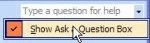
Hide the Type a question combobox on your Office toolbars using the customize menu. Open the Customize dialog using Tools, Customize then right click on Type a question and remove the checkbox. Repeat for each window you want to remove it from. … [Read more...] about Tip 96: Hide 'Type a question'
Tip 95: Locating Read Receipts
Outlook stores read receipts in the top level of your message store as a hidden message. If you use Send immediately, the receipts are returned immediately, otherwise, the next time you check for new mail, Outlook sends the receipts. If you don't have access to the SMTP server used by the account when you send/receive, you may receive an error when the receipt attempts to … [Read more...] about Tip 95: Locating Read Receipts