![Diane Poremsky [Outlook MVP]](http://www.outlook-tips.net/images/2014/MVP_BlueOnly.png)
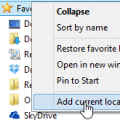
A user discovered the Recent Documents link is missing from the Insert File dialog:I recently upgraded to Windows 7, replacing Windows XP. When I attached a recent document while in Outlook on Windows XP, I just had to click on the "Attach File" button and select "Recent Documents" to see the documents I recently created and attach them to my email message. I cannot find … [Read more...] about Tip 1095: Add Recent Documents link to Insert File dialog
Tip 1094: iTunes creates ModGrp folders in Outlook

A user had this problem: When I sync my iPod Touch to Outlook 2013 it creates hundreds of additional contact folders, all prefixed with "_ModGrp..." I re-installed Outlook and iTunes but it's still not working correctly. Apple says it is a problem with Outlook and that Outlook 2013 is not compatible with iTunes. It's not Outlook 2013 that is the problem; this has been … [Read more...] about Tip 1094: iTunes creates ModGrp folders in Outlook
Tip 1093: Status Bar View shortcut icons override display settings
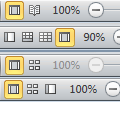
Outlook 2010 and 2013 have View buttons in the Status bar that switch from the "normal" view to a view better suited for reading, with the Navigation Bar, To-Do Bar, and ribbon minimized and a wider reading pane.In Outlook, when I change views using status bar View shortcuts icons, the ribbon is always shown, regardless of if it was shown or hidden. This is annoying if … [Read more...] about Tip 1093: Status Bar View shortcut icons override display settings
Tip 1092: Change Outlook 2013 Yellow Note Color
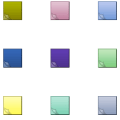
What happened to the note colors that have been in Outlook since 1997? The only option is yellow.In an effort to streamline Outlook and remove features that got little use, Microsoft removed some features from notes, including the ability to change the color of the notes.Although Microsoft removed the note colors and the choice of default sizes, you can add some color … [Read more...] about Tip 1092: Change Outlook 2013 Yellow Note Color
Tip 1091: Outlook 2013's blue icon
It seems that Outlook's color change (from orange to blue) is not well liked by a number of users. A small sampling of the complaints I've received:Where did the yellow-orange icon go for Outlook 2013? The new blue icon for Outlook looks too much like the blue icon for Word. We've been 'taught' through daily use over 15 years that Yellow=Outlook and Blue=Word. … [Read more...] about Tip 1091: Outlook 2013's blue icon