![Diane Poremsky [Outlook MVP]](http://www.outlook-tips.net/images/2014/MVP_BlueOnly.png)

How do I get rid of those placeholder photos in Outlook? When I open an email I see that dumb place-holder photo under Reply. Is there a way to get rid of that photo and the other two photos on the bottom right of the window?The top one is a contact photo. Go to File, Options, People and uncheck Show user photographs when available (requires restarting Outlook) to turn off … [Read more...] about Tip 1085: Stop showing contact photos in Outlook
Tip 1084: Add to Contacts in Outlook 2013
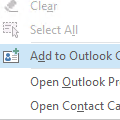
When reading or replying to an email I used to be able to right-click on a email address in the From or To fields and the context menu would give me an option to add that person to my Outlook Contacts. I used to use that all the time - a great time saver - but I don't see it in Outlook 2013?It's still there, but Add to Outlook Contacts is only visible if the contact does … [Read more...] about Tip 1084: Add to Contacts in Outlook 2013
Tip 1083: View Attachments is missing from the context menu
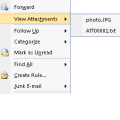
What happened to 'View Attachments' context menu item in Outlook 2010?In older versions of Outlook, when you were viewing any folder, if a message had an attachment, you could right click on the email (without opening it) to bring up a context menu containing the option to View attachments.The View Attachments command allowed you to view the filenames of any … [Read more...] about Tip 1083: View Attachments is missing from the context menu
Tip 1082: Attachments are hidden in Outlook 2013 Outlook.com accounts
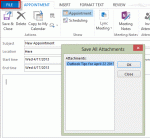
Problem: When you use an Outlook.com account in Outlook 2013 (using EAS) and insert an attachment into an appointment, contact, or task, the attachment is not visible in the message body. All attachments - files and Outlook items - are affected by this bug.Click the Copy to My Calendar command to create a copy of the appointment on your default calendar and the … [Read more...] about Tip 1082: Attachments are hidden in Outlook 2013 Outlook.com accounts
Tip 1081: Add hyperlinked icon to an Outlook signature
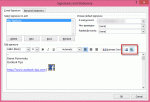
A popular question the last couple of weeks was "How do I add social networking icons to my signature?"Easy. Find the icons you want to use. If they are larger than you want, reduce the size in SnagIt or InfranView. Create a new signature or edit an existing signature and insert the images and hyperlink them.In Outlook 2010 or Outlook 2013: Open the Signature … [Read more...] about Tip 1081: Add hyperlinked icon to an Outlook signature