![Diane Poremsky [Outlook MVP]](http://www.outlook-tips.net/images/2014/MVP_BlueOnly.png)
Do you have a need for a text file containing a list of the rules assigned to your Outlook 2007 or Outlook 2010 default email account? A visitor to Slipstick.com submitted a code sample that creates a text file with the rule names and the From condition, in the order they are listed in Rules & Alerts. It still needs a bit of tweaking to include all Conditions and Actions in the … [Read more...] about Tip 945: Print a list of your Outlook Rules
Tip 944: Hide Header in Reading Pane
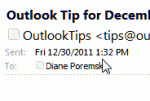
The header in the reading pane or in an open message takes up quite a bit of screen real estate: In older versions of Outlook you can shrink the header down to the subject line by editing the view or by carefully right clicking on the left edge of the reading pane and selecting Header Information to toggle it off and on. In Outlook 2007, only the subject shows (as … [Read more...] about Tip 944: Hide Header in Reading Pane
How to always download images in Outlook email
Outlook protects your privacy by blocking the download of external content ("web bugs") by default. You can easily change this setting if you prefer to download everything at once. My story: Years ago, when web bugs were first being talked about as a privacy issue and when Outlook was full of security holes, I used a preview pane add-in called Chilton Preview. It displayed … [Read more...] about How to always download images in Outlook email
Tip 943: Search for Email Sent To or From a Domain
An Outlook user asked how to create a search for a messages sent to or from a domain (eg "@company.com") and include not only email sent to and from himself, but also messages that he was CC'd on.There are three options which will work to varying degrees:1. A search folder. Choose the 'To or From' predefined search folder and type the domain (microsoft.com format will … [Read more...] about Tip 943: Search for Email Sent To or From a Domain
How to install Outlook on a Netbook
So you got a new netbook or laptop but it doesn't have a CD/DVD drive. How will you get Outlook installed? And, really, is it worth installing a memory-pig like Outlook on a netbook? Yes, in my opinion, if you use Outlook on your desktop, its worth installing it on the netbook or laptop too. You might want to use a custom install and only install the parts of the Office … [Read more...] about How to install Outlook on a Netbook