![Diane Poremsky [Outlook MVP]](http://www.outlook-tips.net/images/2014/MVP_BlueOnly.png)
Users who wanted to be warned when they close Outlook could use the trick listed at Do You Accidentally Close Outlook? (works for all older versions). This involved saving a draft message and dragging it to the Outbox. Very simple and it worked well. Update June 29 2011: Outlook 2010 SP1 displays a warning if an unsent message is in the Outbox. While you can't use a draft … [Read more...] about Tip 846: Do you really want to close Outlook 2010?
How to mail merge from Microsoft Outlook
Return to Use Outlook's Contacts with Mail Merge | Mail merging to Labels Use the Mail Merge toolbar to access the advanced mail merge options. The Mail Merge toolbar looks like this and have the following buttons on it: Main Document SetupUse this button to select or change the mail merge document type. Open Data Source & Mail … [Read more...] about How to mail merge from Microsoft Outlook
"Who created the appointment?"
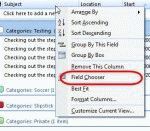
When you use Exchange server, anyone with proper permission to your calendar can open it and add an appointment. While the person's name or Exchange alias is listed as the Organizer, its not easily discovered by many users. Outlook 2007 makes it easier by placing the organizer's name in the subject field (much to the annoyance of many people). The easiest way to see who … [Read more...] about "Who created the appointment?"
Tip 845: Hotmail Error: 3202 HTTPS is not turned on

Update: Outlook Hotmail Connector now supports HTTPS.We’re seeing a few users reporting the following errors caused by enabling HTTPS support in Hotmail/Live. Because there are so few complaints, it either means Hotmail users don’t care about security or they aren’t using the Outlook Connector.Task '<username>@hotmail.com' reported error (0x8004102A) : 'Error with … [Read more...] about Tip 845: Hotmail Error: 3202 HTTPS is not turned on
Tip 843: Hotmail contact categories and Outlook categories
I thought I mentioned this months ago but can’t find it in my archives… if it’s a repeat, sorry (and please let me know what date it ran.)Hotmail lets you assign contacts to categories; Outlook lets you assign categories to contacts. So why don’t the Categories sync when you use the Outlook Connector?Categories don’t sync as categories because “categories” doesn’t mean … [Read more...] about Tip 843: Hotmail contact categories and Outlook categories