![Diane Poremsky [Outlook MVP]](http://www.outlook-tips.net/images/2014/MVP_BlueOnly.png)
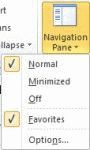
We get a lot of questions about the Mail Favorites gone missing. In many cases, they aren't really missing, but the user is looking at the wrong navigation pane. When this is the case, you can use the Mail button on the navigation pane or press Ctrl+1 on the keyboard to jump to the mail pane.These screenshots show Outlook 2010's Mail Navigation pane and Folder list pane. … [Read more...] about Tip 836: Missing Mail Favorites?
Tip 835: Using Office 2010 Home & Student with Outlook 2010
Office 2010 Home & Student is an affordable option for non-commercial use but it lacks Outlook. Outlook 2010, when purchased by itself, is missing some features found in the version installed from a suite, including SmartArt and themes. One would think that Outlook would pick up the missing features from Word but users are discovering it doesn’t work like that; to have … [Read more...] about Tip 835: Using Office 2010 Home & Student with Outlook 2010
Office Assistant requires Microsoft Agent error
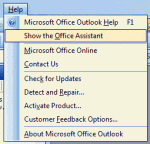
Installing Office 2003 on Windows 7/8 and enabling the Office Assistant will result in this error:The Office Assistant requires Microsoft Agent 2.0 or later versions. This product is available in the Office System Pack.Because Agent is not included in Windows 7, anyone who tries to use the Office Assistant will receive this error. The solution is to not use the … [Read more...] about Office Assistant requires Microsoft Agent error
Changing the Microsoft Office CD Key
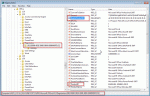
It happens more often than you might think: you have two Office licenses and install the wrong one on a computer. If you activate it, Microsoft will think you moved it to a new computer and it can create problems later on.How do you change the installation key without reinstalling Office?Close all Office applications that are open. Open the registry editor by pressing … [Read more...] about Changing the Microsoft Office CD Key
Tip 833: Open Outlook with multiple calendars selected
A popular request is the ability for Outlook to remember what calendars were selected when you last used Outlook and to reselect them at startup. The good news: Outlook 2007 and 2010 should remember the selected Calendars. The bad news: it only remembers when you “start in” the Inbox or non-calendar folder. If the calendar module opens at start, only the default … [Read more...] about Tip 833: Open Outlook with multiple calendars selected