![Diane Poremsky [Outlook MVP]](http://www.outlook-tips.net/images/2014/MVP_BlueOnly.png)
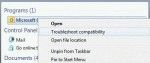
We're seeing more and more errors caused by compatibility mode. I couldn't understand why users were even touching the compatibility mode settings until someone said they ran the Troubleshoot Compatibility utility in Windows and IT made the changes. Yikes. When you right click on the application shortcut, one of the options is Troubleshoot compatibility. DO NOT use this. … [Read more...] about Microsoft Window's "Troubleshoot Compatibility" errors in Outlook
Tip 832: View the Properties dialog
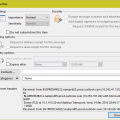
In Outlook 2007 and older, users could open an item then go to File, Properties and view a dialog that included archive options, importance and sensitivity settings, and the sent, received, and modified times.In Outlook 2010, the properties dialog is the Message Options dialog – it has archive options, importance and sensitivity settings, expiration settings, contact and … [Read more...] about Tip 832: View the Properties dialog
Tip 830: Outlook 2010, IMAP & Send to commands
I’m hoping this will be my next-to-last post about the problem of Outlook2010’s handling of multiple accounts when an IMAP account is the default email account. (The last post will be an announcement that users can revert to the old way of handling default accounts. I don’t know if it will ever happen though.) The problem: Outlook 2010 chooses the email account to send mail … [Read more...] about Tip 830: Outlook 2010, IMAP & Send to commands
Outlook's File tab is active, not the Home tab

If the ribbon in Outlook 2010 or Outlook 2013, or on open items in Outlook 2007, is missing, you have the ribbon minimized. When the ribbon is minimized, the File tab appears to be the default tab, instead of the Home or Messages tab.Actually, the File tab isn’t really made the default, it just seems so because of the tab color. While it is an extra click to show the … [Read more...] about Outlook's File tab is active, not the Home tab
Tip 828: Suggested Contacts
I’m seeing quite a bit of confusion over the Suggested Contacts folder in Outlook 2010. It’s a contacts folder containing addresses you’ve sent mail to that are not already in your “good” contacts folder. It’s not a copy of the autocomplete cache, although addresses in the folder should also be in the autocomplete cache (unless you cleared the cache). Importing an old … [Read more...] about Tip 828: Suggested Contacts