![Diane Poremsky [Outlook MVP]](http://www.outlook-tips.net/images/2014/MVP_BlueOnly.png)
An interesting problem came up in the Microsoft public newsgroups a couple of times in recent weeks. Users wanted to know how they could autoaccept meeting requests from specific organizers. This is possible if you use an version of Outlook that supports Run a Script action in Rules Wizard. Begin with a rule using the conditions "from people or distribution list" and "uses … [Read more...] about Tip 471: Autoaccept Meeting Request Using Rules
appointments
Tip 454: View Reminder Times
Simple question:Is there a way to print reminders in Outlook? Outlook doesn't offer a predefined way to do this but you can create a custom view which will show the reminder times and print it. It's not perfect, but short of doing a screen print of the reminder window (which only gets you the current reminders), it works. As with anything recurring, this only works as expected … [Read more...] about Tip 454: View Reminder Times
Tip 452: Recurring Appointments
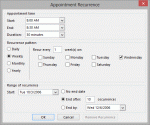
Do you need to set up recurring quarterly appointments but Outlook doesn't offer a quarterly option? Try using every 3 months, every 13 weeks, or every 90 days.Need an appointment set for every other year? Use 24 months. (Later versions of Outlook include a yearly recurrence.) … [Read more...] about Tip 452: Recurring Appointments
Tip 330: Delete Future Recurring Appointments
An Outlook user asks: How can I have all of the future re-occurring meetings (ie for 2014) removed from my calendar, but keep the 2013 appointments? A further twist to this scenario - some of the individual meetings in 2013 were cancelled, and some moved to other times, so I cannot just recreate the re-occurring appointment for 2013 myself and then remove the re-occurring … [Read more...] about Tip 330: Delete Future Recurring Appointments
Tip 322: Imported Appointments are 'Busy'
In a long ago tip, I explained how to create a count down calendar - but when it's imported, the events are shown as busy in the calendar. A reader asksCan that be changed so I am shown as 'available'?Of course, and you have two ways you can do it.The first: the easiest for 'after the fact' changes is to use a List view and group by the Show time as field. Then … [Read more...] about Tip 322: Imported Appointments are 'Busy'