![Diane Poremsky [Outlook MVP]](http://www.outlook-tips.net/images/2014/MVP_BlueOnly.png)
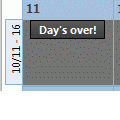
A lot of people want Outlook’s calendar to work like a paper calendar – they want to cross off appointments as they finish or X out “yesterday” to mark it complete. Also see Automatically change Appointment categories using VBA Outlook doesn’t offer such an option, but Outlook 2007 (and up) users can use color categories to mark events ‘completed’. Just create a Completed … [Read more...] about Mark Appointments or Dates Completed in Outlook
calendar
Tip 503: Display Work Hours
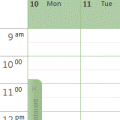
John asksI'd be happy if I could get my calendar to start with showing the start of my workday just below the all day events -- instead of 5AM. My workday starts at 8AM. I have reset my view, thinking maybe there was something in my customized view. Any ideas?This is another case where size matters. When the window height is large and the time scale set to longer … [Read more...] about Tip 503: Display Work Hours
Tip 471: Autoaccept Meeting Request Using Rules
An interesting problem came up in the Microsoft public newsgroups a couple of times in recent weeks. Users wanted to know how they could autoaccept meeting requests from specific organizers. This is possible if you use an version of Outlook that supports Run a Script action in Rules Wizard. Begin with a rule using the conditions "from people or distribution list" and "uses … [Read more...] about Tip 471: Autoaccept Meeting Request Using Rules
Tip 468: 2008 Holidays

Older versions of Outlook are "missing" holidays for 2008 and beyond. Microsoft has released updates for some versions and I converted the file to support older versions... see Outlook’s Missing Holidays for the download and more information.To use the file, replace the existing holiday file found in the 4-digit language folder under C:\Program Files\Microsoft … [Read more...] about Tip 468: 2008 Holidays
Tip 463: Another Calendar Printing Bug
Outlook 2007 has a lot of calendar printing bugs, which I suppose, is why they released a Calendar Printing Assistant. Some were fixed in SP1. Others are just coming to my attention, probably because I don't print calendars. The newest bug involves printing a series of full month calendars. If you start the series in a month that spans 6 calendar weeks, each monthly calendar … [Read more...] about Tip 463: Another Calendar Printing Bug