![Diane Poremsky [Outlook MVP]](http://www.outlook-tips.net/images/2014/MVP_BlueOnly.png)
When you use Outlook 2003 with Word as your editor or Outlook 2007 / 2010 / 2013, you can assign a signature to each account and Outlook will use the correct signature when you change accounts. In Tools, Options, Mail format tab, Signatures (Outlook 2003/2007) select *each* account from the dropdown account list and assign a signature. In Outlook 2010 and 2013, go to File, … [Read more...] about Tip 773: Accounts & Signatures
Tip 675: Show dismissed dialog
An Outlook user asked: While pasting images to a plain text email, a dialog box will pop up: Microsoft office outlook compatibility checker: some of the features in this document aren't supported by plain text e-mail. Summary <feature> will be lost. It includes a check box for Don't show this dialog box again. I accidentally clicked on the check box. How do I get … [Read more...] about Tip 675: Show dismissed dialog
Denied Access to Hotmail, Live, or MSN accounts in Microsoft Outlook
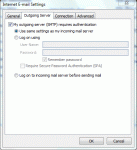
If you have an MSN or Hotmail account and are suddenly getting ‘access denied’ or 'forbidden' errors when you try to download mail through Outlook you probably missed the announcement that access using the HTTP protocol was going to end for good on Sept 1, 2009. From this point on, users will need to use either the Outlook Connector or POP3/SMTP to view their Hotmail/MSN … [Read more...] about Denied Access to Hotmail, Live, or MSN accounts in Microsoft Outlook
Tip 567: Add Comments to Email

If you use Outlook 2007, you can add comments to an HTML or RTF email, using the same Reviewer comment used with Word. (It doesn’t work with plain text. Outlook 2010 or Outlook 2013.)You need to be in Edit mode (Other Actions button, Edit message) then select a word or phrase and Ctrl+Alt+M to insert a comment.If you reply to the message after inserting the comment, it … [Read more...] about Tip 567: Add Comments to Email
Tip 489: Insert as Text
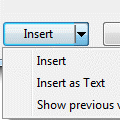
An Outlook user is trying to insert a Word document into an email, but Outlook wants to attach it to the email instead of being inserted into the message body as text.If all else fails, he could open the document and use copy and paste, but that’s not necessary. After selecting the document in the Insert dialog, click the little arrow on the Insert button and choose Insert … [Read more...] about Tip 489: Insert as Text