![Diane Poremsky [Outlook MVP]](http://www.outlook-tips.net/images/2014/MVP_BlueOnly.png)
When you create a signature containing an image in an Outlook message form then copy and paste it into the New signature dialog, the image may not be visible, but have no fear, the image might be out of sight but it’s not gone for good. When you insert the signature into a message, you’ll see the image (and the formatting and layout should be perfect, exactly like you designed … [Read more...] about Tip 848: Pasting images into the Signature Editor
How to mail merge from Microsoft Outlook
Return to Use Outlook's Contacts with Mail Merge | Mail merging to Labels Use the Mail Merge toolbar to access the advanced mail merge options. The Mail Merge toolbar looks like this and have the following buttons on it: Main Document SetupUse this button to select or change the mail merge document type. Open Data Source & Mail … [Read more...] about How to mail merge from Microsoft Outlook
Tip 830: Outlook 2010, IMAP & Send to commands
I’m hoping this will be my next-to-last post about the problem of Outlook2010’s handling of multiple accounts when an IMAP account is the default email account. (The last post will be an announcement that users can revert to the old way of handling default accounts. I don’t know if it will ever happen though.) The problem: Outlook 2010 chooses the email account to send mail … [Read more...] about Tip 830: Outlook 2010, IMAP & Send to commands
How to configure Outlook to leave mail on the server
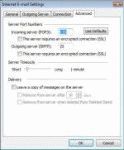
Many users would like to leave their e-mail on the server so they can download it from other computers or read mail using their provider's web interface.This setting is found only in POP3 accounts - IMAP always leaves mail on the server, as does Exchange Server (assuming you are not using a PST as the delivery location) and the Outlook Connector for Hotmail/MSN.In … [Read more...] about How to configure Outlook to leave mail on the server
Return an email to the sender

We see a lot of questions that go something like this: I would like to not only block particular emails but also send them back to the sender so they know they've been rejected. Is that possible. Right now I can only send them to the Junk email folder. Thanks. Yes, you could do this (using an autoreply rule), but why? If the message is from a spammer with a legitimate … [Read more...] about Return an email to the sender