![Diane Poremsky [Outlook MVP]](http://www.outlook-tips.net/images/2014/MVP_BlueOnly.png)
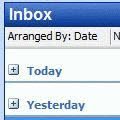
Note: You can use this method to apply any changes to all folders using the same view. It's not limited to the group by feature. While this method also works with Outlook 2010, you can create a custom view and apply it to all folders. Look for the Apply to all folders option on the View ribbon, Change View button. Apply to all folders is useful if you have custom views you … [Read more...] about Disable the Group By View in Outlook
outlook
Outlook's Contact (and Journal) Icons

These are the icons you'll see when you are looking in the Contacts folder. At the end are icons Exchange server users might see in the Global Address Book (GAL).IconsDescriptionContact FormDistribution listJournal-enabled Contact (Tools, Options, Journal Options, Contacts that are checked) Not supported in Outlook Live.Custom … [Read more...] about Outlook's Contact (and Journal) Icons
Tip 843: Hotmail contact categories and Outlook categories
I thought I mentioned this months ago but can’t find it in my archives… if it’s a repeat, sorry (and please let me know what date it ran.)Hotmail lets you assign contacts to categories; Outlook lets you assign categories to contacts. So why don’t the Categories sync when you use the Outlook Connector?Categories don’t sync as categories because “categories” doesn’t mean … [Read more...] about Tip 843: Hotmail contact categories and Outlook categories
How to change the Calendar date format
A frequent question: When I view the calendar in Week mode it displays the dates, but not the days of the week. Is there an option to show the day? If you don't like the date format Outlook uses on-screen or in printouts, you need to change the long date format set in Windows Control panel, Regional settings. Note, the day of the week format is controlled by the width … [Read more...] about How to change the Calendar date format
Tip 810: Outlook's Address Book Search
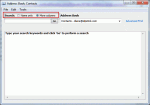
An Outlook user had this complaint: "I used to click on the address book icon and the address book would open to a nice listing of my contacts. Now I get a search box requiring me to enter a search term. How do I get my old address book format back?" Type your search keywords and click "Go" to perform a search At the top of the address book dialog are two … [Read more...] about Tip 810: Outlook's Address Book Search