![Diane Poremsky [Outlook MVP]](http://www.outlook-tips.net/images/2014/MVP_BlueOnly.png)
This tip was submitted by Hedgehog: I have a tip for you that I have not seen posted on the web, and that has been driving me, and obviously others crazy. It has to do with ordering task views so that a due date of "None" appears at the end of the list, yet the other due dates appear in ascending order. One simple (but not completely foolproof) way to do this is to … [Read more...] about Tip 900: Sort Tasks with "None" at the End
tasks
Tip 867: Custom Priority field in Microsoft Outlook Tasks
Many users are excited when they see the field called Custom Priority in the Field chooser dialog, thinking that Outlook finally lets them customize the priority. No such luck. That field is used with SharePoint tasks folders that are linked to Outlook. It won't work on other task folders in Outlook.If you are looking for custom priorities, you're out of luck. Outlook … [Read more...] about Tip 867: Custom Priority field in Microsoft Outlook Tasks
Outlook's Calendar and Task Icons

The following are icons you may see in Outlook 2013, Outlook 2016, or newer Calendar folders. If you have an older version of Outlook, the icons will be similar in most cases. Calendar Icons In current versions of Outlook, the Daily, Week, and Monthly calendars won't display icons by default. You'll need to turn on the option to Show bell icon on the calendar for appointments … [Read more...] about Outlook's Calendar and Task Icons
Tip 751: Task subject on two lines
This week a couple of users asked if there was any way to make the Subject line in a Task two lines. In Outlook 2003 the subject line expanded if it did not fit in one line; now it scrolls. No, unfortunately you can’t change the subject line in Microsoft Outlook 2007 or Outlook 2010 so it expands to two lines instead of scrolling. … [Read more...] about Tip 751: Task subject on two lines
Tip 633: Tasks, Reminders & Due dates
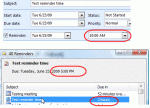
Recent updates to Outlook 2007 changed the behavior of tasks in the reminder window. In the past, reminders that fired at 10 AM showed due at 10 AM in the reminder window and an hour overdue at 11 AM. Now, the reminder window shows the tasks due at the end of the workday (set in Tools, Options, Calendar options) so the same task that was overdue at 11 AM is now due in 2 … [Read more...] about Tip 633: Tasks, Reminders & Due dates