![Diane Poremsky [Outlook MVP]](http://www.outlook-tips.net/images/2014/MVP_BlueOnly.png)
An Outlook 2013 user asked this question recently:
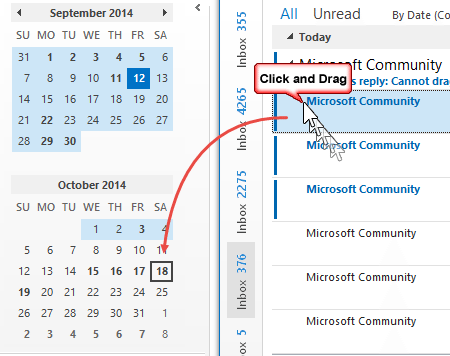
In Outlook 2010 I often drag and drop emails to a certain date in the calendar to-do pane. In Outlook 2013 I am not able to do that. How come?
When Microsoft replaced the To-do Bar with the Peeks, they used a different navigation calendar control and it does not support drag and drop.
You can't drag to the navigation calendar in a docked peek, also known as the To-Do Bar, like we could to the old To-Do Bar, but you can drag and drop on the Calendar icon ( ) if you are using compact navigation, or drop it on the word Calendar (
 ) when using full navigation.

I drop messages on the Calendar in the folder bar and type a date and the time. Yes, it’s a little more typing, but I can use shortcuts like 2d, 1w so entering the date doesn't add a lot of extra work.
For specific dates within the next 12 months, type it in 12/25 format (or 25/12 if your computer is using that format). Outlook will assume the date in the next occurrence.
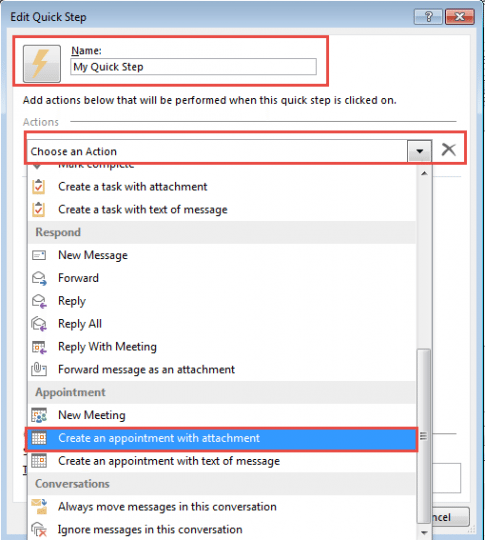
If you don't want to drag and drop the email to the calendar shortcut you can also create a Quick Step that creates a new calendar entry.
I cannot work out any way of dragging an email to the calendar in outlook 2013 – even if you set a date. Can you explain further?
Click and drag to the Calendar icon or Calendar word.

The dates are always different and included in the mail. Yeah, drag it to the 'Calendar' word and fill in the day… come on you Guy's … are you serious??? I want to take my mail and drag it to the exact date on my Calendar, this is how it supposed to work! Especially on my W8.1 tablet on which i want to use the keyboard as less as possible! I cannot believe that MS removed this kind of simple Drag&Drop from Outlook, SHAME YOU!
Yes, shame on the product team for removing this feature. The navigation calendars in the Calendar module still use the old calendar control, so if you keep the calendar open in a second window, you can still drag to a specific date.
One note on using the tablet, Outlook has poor support for touch and you’ll need to use a pen to drag the message. Quick Steps are perfect for tablets!
As long as two windows are open and one is the calendar, you can click and drag (right click or left click) to the Outlook button on the ribbon and hover over the calendar window to bring it up (that's an old Windows trick).
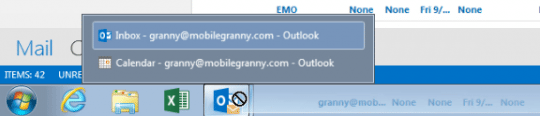
Hovering over the calendar icon/word won't switch to the calendar navigation pane in the same window as it did in previous versions.
Create an 'Add to Calendar' Quick Step
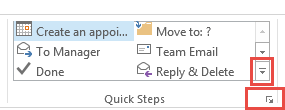
If you prefer to use a Quick Step, open the Quick Step Manager, either by clicking the Expand icon  or click the bottom scroll bar button. (Highlighted in the screenshot above.)
- Click New or New Quick Step
- Choose Custom
- Change the Quick Step name and icon, if desired.
- In Choose an action, scroll down and select Create an appointment with attachment or Create an appointment with text.
- Assign a shortcut, if desired.
- Click Finish
To use, select a message and click the quick step button. A new appointment form opens, enter the date and time and click Save & Close to add it to your default calendar.
If you want to add it to a different calendar, click Save then the File, Move to Folder command instead of Save & Close.
Add the Move to Folder command to the ribbon, next to Save & Close button so it’s easier to use the move to folder command.
Drag to Create Appointments Video Tutorial
More Information
Vote on this feature at Outlook Forums Drag and drop email to a calendar date (You'll need to register at the forum to vote, the new forum software does not allow voting by guests. Sorry.)
Published September 12, 2014. Last updated on January 22, 2015.