![Diane Poremsky [Outlook MVP]](http://www.outlook-tips.net/images/2014/MVP_BlueOnly.png)
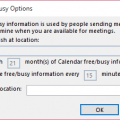
At the end of each month we see a lot of complaints that Free/Busy publishing isn't working because users can only see the next month's free/busy information.We need to plan a meeting more than 2 months into the future but are unable to see others' calendars past September 30. After that, everyone’s schedule shows up as "no information." Is there is a way to change it so … [Read more...] about Tip 456: Free/Busy Publishing
Tips Archive
Tip 455: Import from Incredimail
If you use Incredimail and want to import the messages to Outlook, you'll need to use a program that can convert them to a format Outlook supports. Incredimail Backup Pro will export them to EML format (used by Outlook Express) and once they are in OE, you can export them to Outlook. IncrediConvert is free but may not work with all versions of Incredimail due to file … [Read more...] about Tip 455: Import from Incredimail
Tip 454: View Reminder Times
Simple question:Is there a way to print reminders in Outlook? Outlook doesn't offer a predefined way to do this but you can create a custom view which will show the reminder times and print it. It's not perfect, but short of doing a screen print of the reminder window (which only gets you the current reminders), it works. As with anything recurring, this only works as expected … [Read more...] about Tip 454: View Reminder Times
Tip 453: Insert Dialog Sort Order
Do you wish the files listed in the Insert File dialog were in a different sort order? Right click on a blank area in the Insert file window and choose Sort to select a different sort order. These explorer windows (including Insert, Save, and Open dialogs) have the same sort and view capabilities that are available in Windows Explorer. … [Read more...] about Tip 453: Insert Dialog Sort Order
Tip 452: Recurring Appointments
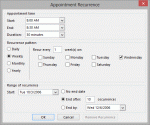
Do you need to set up recurring quarterly appointments but Outlook doesn't offer a quarterly option? Try using every 3 months, every 13 weeks, or every 90 days.Need an appointment set for every other year? Use 24 months. (Later versions of Outlook include a yearly recurrence.) … [Read more...] about Tip 452: Recurring Appointments