![Diane Poremsky [Outlook MVP]](http://www.outlook-tips.net/images/2014/MVP_BlueOnly.png)
Using Exchange server, is there a way for a user to select whether they want to send-as or send on behalf of if they are given both permissions? No, if a user has both permissions, they cannot select how the message is sent. … [Read more...] about Tip 450: Send as, Send on behalf of
Tips Archive
Tip 448: Create Custom Search Folders
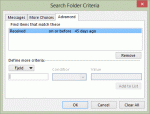
Following up on the earlier the tip about using natural language in search folder criteria, this tips explains how to create a custom search folder.Create a new Search folder by right clicking on Search Folders and choosing New Search Folder... (You can also use the File, New menu.) Choose the last option to create a new, custom search folder. (You can get there fast … [Read more...] about Tip 448: Create Custom Search Folders
Tip 445: Group Header Format
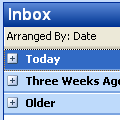
If the group headers ("today", "yesterday" etc) lack contrast and are difficult to read, the only option you have is to shade the group heading. Shading makes the group header smaller, shaded and uses black text.Click on the row of field names in the message list and choose Custom..., Other Settings.This setting is one of the very few global settings used in … [Read more...] about Tip 445: Group Header Format
Tip 443: Combine Two Calendars
A lot of users ask: "I have two different calendars in Outlook. Can I get them into one calendar?" Easy, switch to a table view - By category view works great for this - then click on one item, press Ctrl+A to select all and drag to the default calendar. You can also cut and paste after selecting all or choose Edit, Move to (Ctrl+Shift+V). … [Read more...] about Tip 443: Combine Two Calendars
Tip 442: More on Hyperlinks
It seems like a lot of people are having problems using yesterdays tip with Outlook 2003. Yes, it does work with Outlook 2003. I'm pretty sure it also works with Outlook 2002 and possibly Outlook 2000 (but haven't loaded a machine to verify either yet). It will work with any version that supports Hyperlinks on the toolbar buttons. Hyperlinks used to be very useful (not that … [Read more...] about Tip 442: More on Hyperlinks