![Diane Poremsky [Outlook MVP]](http://www.outlook-tips.net/images/2014/MVP_BlueOnly.png)
Do you send messages to the same people often? Save a few steps by creating a hyperlinked toolbar button that holds their address in a mailto: command. Go to View, Toolbars, Customize to open the customize dialog. Drag a button from the command section to a toolbar - I usually use Mail Message. Right click on the button in the toolbar and choose Assign Hyperlink... … [Read more...] about Tip 441: Create Address Buttons
Tips Archive
Tip 440: Show Appointment Times in Month View
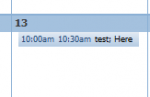
Question: How do I get appointment's start time to be displayed in numbers in the month view? I can see them in the To-Do Bar, but not in calendar itself. Answer: This is one time size really does matter. Like many things in Outlook, what you see is directly related to the size of the window. If there is enough room for at least 8 characters of the appointment … [Read more...] about Tip 440: Show Appointment Times in Month View
Tip 439: Send Multiple Meeting Requests

A frequent request in the Microsoft newsgroups is from users looking for a way to send out meeting requests for training sessions or benefits meetings with HR, where each employee can pick the session that fits their schedule. The selected meeting date needs to be added to the recipients calendar and the senders copy needs to have a list of the attendees.I want to … [Read more...] about Tip 439: Send Multiple Meeting Requests
Tip 438: Turn Off the Time Zone Prompt
If you get the Time Zone prompt every time you load Outlook 2007 and want to disable it, you'll need to edit the registry. At the Start menu, Run command, type regedit. Browse toHKEY_CURRENT_USER\Software\Microsoft\Office\12.0\Outlook\Options\Calendar Create a DWORD value "DisableTimeZoneAutoPrompt" and enter a value of 1 This will stop the Change Calendar Time Zone prompt … [Read more...] about Tip 438: Turn Off the Time Zone Prompt
Tip 437: Form can't be Displayed
If you are unable to create new calendar event and receive the "The Form required to view this message cannot be displayed. Contact your administrator". You need to empty your forms cache. You can do this through the Outlook interface at Tools, Options, Other, Advanced, Manage Forms. … [Read more...] about Tip 437: Form can't be Displayed