![Diane Poremsky [Outlook MVP]](http://www.outlook-tips.net/images/2014/MVP_BlueOnly.png)
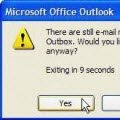
Today's tip is from my son and it works in all versions of Outlook except 2000. (See Tip 184 below for Outlook 2000's method.) Outlook 2010 RTM has a bug that prevents this dialog from coming up. It also requires a slightly different method to trigger this warning.Tip 180: Do You Accidentally Close Outlook?Do you accidentally close Outlook when you mean to minimize it … [Read more...] about Do You Accidentally Close Outlook?
Tips Archive
Tip 179: Disable the Acrobat Addin

If you use Adobe Acrobat, Outlook has a Send as PDF button on the toolbar. If you want to remove the button, you need to disable the COM add-in.Normally, you can disable an add-in from the COM Add-ins dialog, in Tools, Options, Other tab, Advanced Options, COM Add-ins or Add-in Manager (Outlook 2003 and older) or from the Trust Center, Add-ins dialog in newer versions. The … [Read more...] about Tip 179: Disable the Acrobat Addin
Tip 178: When Today isn't Today
When is today not today? When the month started on a weekend (as August 2004 did) and you either you use the compressed weekend view or have the calendar set to begin the week on Monday. The last week of the previous month will be shown at the top of the screen, ending with the first day or two of this month at the end of the week. The last week is off the bottom of the screen … [Read more...] about Tip 178: When Today isn't Today
Tip 175: Forward as iCal
Do you need to send your calendar to someone who uses Outlook or another calendar program that supports iCals? Select the appointments you need to send to someone and choose Actions, Forward as iCal. The recipient can save them and use import or just drag them off the message and drop them into the Calendar folder. … [Read more...] about Tip 175: Forward as iCal
Tip 173: Print a Full Month Calendar
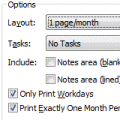
When you try to print a month that covers 6 weeks (such as October 2004), you need to use the Print Options Page Setup option of Print exactly one month per page in order for the full month to print when you include weekends.As an alternative to Outlook's calendar printout, you can use a Word template. Look for links to templates at Calendar Tools for Outlook. … [Read more...] about Tip 173: Print a Full Month Calendar