![Diane Poremsky [Outlook MVP]](http://www.outlook-tips.net/images/2014/MVP_BlueOnly.png)
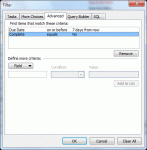
A user has this question: “Is there a way to create a Custom View of Tasks that will show past due tasks as well as any tasks that are due in the next seven days? Is this the type of thing that you can write into the SQL tab?”You could use the SQL tab, but its easier to use the Advanced tab and use Due Date, on or before, and type in “7 days from now” (without the quotes). … [Read more...] about Tip 860: Show all past due and upcoming tasks
Tips Archive
Tip 859: Remove Duplicate Holidays from the Outlook Calendar

We’ve all done it once or twice: accidentally added Holidays twice or duplicated them when syncing with a smart phone. Or, you added holidays for more than one country and decided you didn’t need all of those countries. Fortunately, they aren’t hard to remove and you don’t have to do it one at a time.Use a List view and group by category.Delete all then re-add the Holidays. … [Read more...] about Tip 859: Remove Duplicate Holidays from the Outlook Calendar
Tip 858: Outlook stops working after installing Word Perfect
We’re seeing reports where Outlook won’t run and attempting to open the Mail applet in Control panel results in an error that says you have run out of system resources. The common thread: the users recently installed Word Perfect. The solution: delete or rename the Profiles key, then go to Control panel, search for Mail and create a new profile.The Profiles key (for … [Read more...] about Tip 858: Outlook stops working after installing Word Perfect
Tip 857: Microsoft Outlook 2007: Problems printing after installing KB2509470
After installing KB2509470, users are experiencing problems printing or previewing messages using the Memo style. The Outlook team is aware of this issue and have removed the update from availability. Until a new update is released, you can uninstall the update or use System Restore to revert to a time before the update was installed. Problems printing with Outlook 207 after … [Read more...] about Tip 857: Microsoft Outlook 2007: Problems printing after installing KB2509470
Tip 855: Always download external content
It’s not my preferred setting, but many users do want all external content downloaded automatically when they view a message. You can enable automatic download by selecting Choose Automatic Settings from the menu when you click on the Infobar to download content. You download external content settings are: Don't download pictures automatically in HTML e-mail messages or … [Read more...] about Tip 855: Always download external content