![Diane Poremsky [Outlook MVP]](http://www.outlook-tips.net/images/2014/MVP_BlueOnly.png)
Is there a way to set up a rule so that all emails from a specific server (example microsoft.com) go into a specific folder? I can do it individually each time someone from work emails me but want to set it up so that people from microsoft.com who have never emailed me would automatically go into my MS folder?
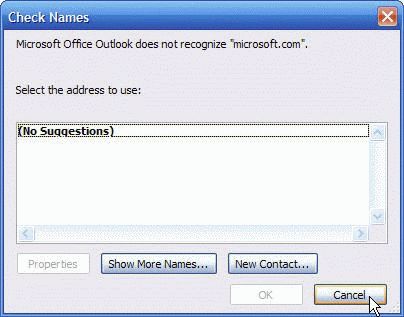
Yes. You need to enter just the email domain in the rule dialog and cancel the Check Names dialog when it appears.
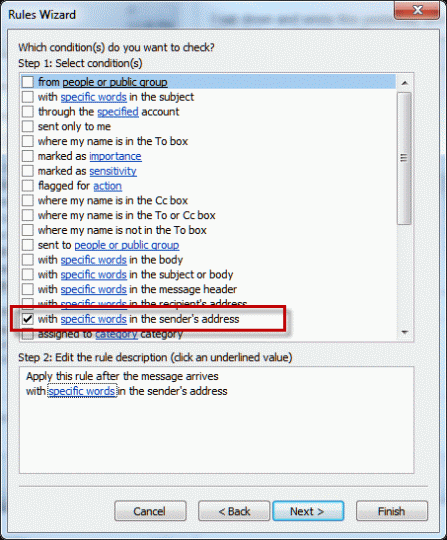
Microsoft Outlook 2010 and up users: Outlook's Rules Wizard includes a condition for "specific words in the sender address" which you can use instead of this rule. (But this rule still works.)
Step 1: Begin creating the rule, choosing the "From people or public group" or "specific words in the sender address" condition. Instead of selecting a contact from the Address list, type the domain portion of the address in the Address field.
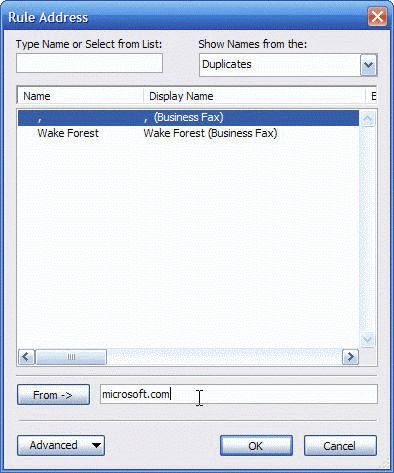
In Outlook 2003, 2007, 2010, or 2013, you'll type it in the From field at the bottom of the dialog.
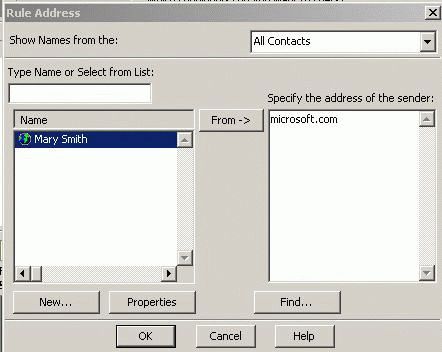
In Outlook 2002, Outlook98/2000 Corporate, type the domain in the right pane. (The address dialog in Outlook 98/2000 in Internet mode doesn't support entering partial addresses.)
Step 2: Click Ok after entering the domain in the address field, then Cancel the Check Names dialog when it appears.
The rule will look like this in Rules Wizard:

Published January 12, 2011. Last updated on June 19, 2021.