![Diane Poremsky [Outlook MVP]](http://www.outlook-tips.net/images/2014/MVP_BlueOnly.png)
If your search index is corrupt or you suspect it's corrupt, you can easily rebuild the index.
There are several ways to access the Indexing options dialog:
From Windows, go to the Control panel and look for "Indexing options", or start typing indexing options in the Start Search field if using Windows 7 and Vista or on the Start Screen in Windows 8. Press Enter when it comes up.
You can also access Indexing Options from Outlook 2010 and Outlook 2013's File, Options, Search dialog. Or, from the Search ribbon: press Ctrl+E or click in the search field to open the Search context ribbon then Search Tools, Search Options.
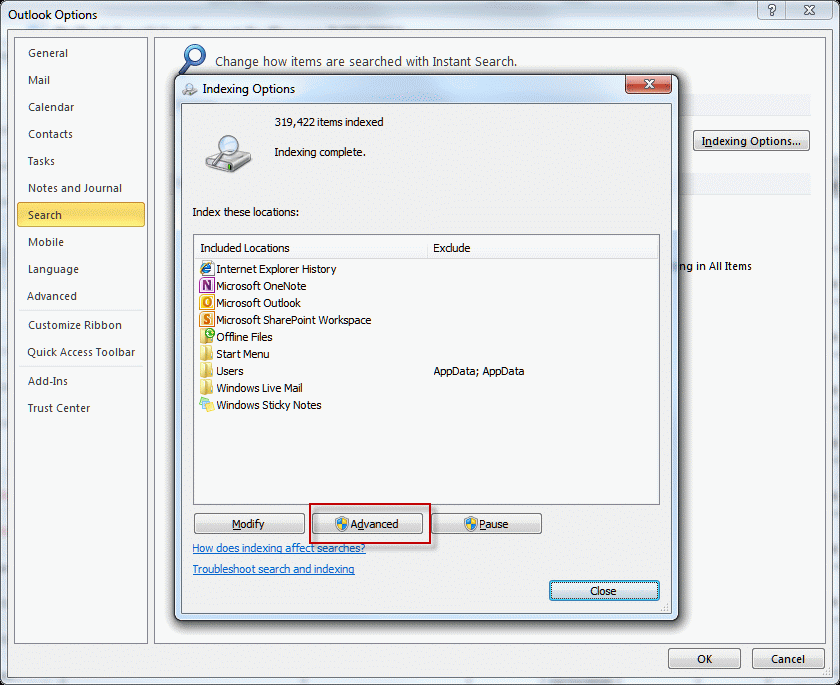
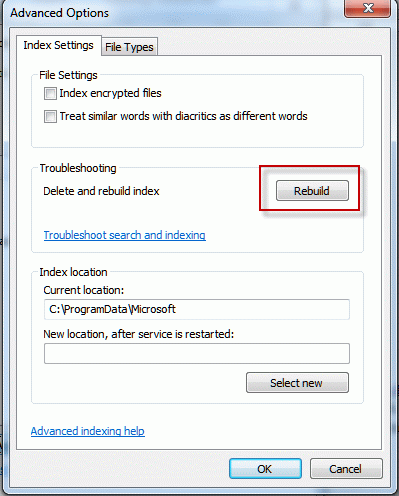
After opening the Indexing options dialog, click the Advanced button, then the Rebuild button.
Published May 25, 2011. Last updated on May 5, 2017.