![Diane Poremsky [Outlook MVP]](http://www.outlook-tips.net/images/2014/MVP_BlueOnly.png)
 Scanpst (aka the Inbox Repair tool) is found in your Office installation folders, usually C:\Program Files\Microsoft Office\OfficeXX, where XX is your version of Office. In Vista and Windows 7 64-bit, the folder is C:\Program Files (x86)\Microsoft Office\OfficeXX.
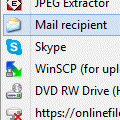
Note: The scanpst icon is a broken envelope. This is supposed to indicate that it works with broken messages. It does not mean the application is broken.
C:\Program Files\Microsoft Office 15\root\office15\scanpst.exe
C:\Program Files\Microsoft Office 16\root\office16\scanpst.exe
Office 2010 Home & Business 'Click to Run' users: With Click to Run, Office is installed in a virtual space on the Q drive and you need to look for the path on the Q drive. If you aren't sure if you are using Click to Run, check File, Help in any Office 2010 application. More info on Click to Run is here.
To find the path on the Q drive, open Word and open the File, Save as dialog, choose 'all files' in the file type dialog and browse to Q:\<14####.lan>\Office14. Copy the Q path and paste it into the address bar of windows explorer.
Replace XX in the following to match your version (the textboxes below are editable), then copy and paste it into the Address bar of Windows Explorer and press enter to open ScanPST.
| Outlook 2016 = 16 Outlook 2013 = 15 Outlook 2010 = 14 Outlook 2007 = 12 Outlook 2003 = 11 Outlook 2002 = 10 Outlook 2000 = 9 | If you are unsure of your version Help, About will list the version in '12.6310.5000' format. If Outlook was installed as part of a suite, Help, About in any of the Office programs will have the correct version number. |
Open Scanpst.exe
On 32-bit Windows or with 64-bit Outlook, using the default installation locations, scanpst.exe is located at:
C:\Program Files\Microsoft Office\OfficeXX\scanpst.exe
On 64-bit Windows with 32-bit Outlook, scanpst.exe is at:
C:\Program Files (x86)\Microsoft Office\OfficeXX\scanpst.exe
You can either use Windows search to find scanpst.exe or browse to it using Windows Explorer. We also offer the following shortcuts you can type or paste into into Start menu's search field or into the Run command (press Windows key + R to open the Run command).
Outlook 2016 Click to Run versions (almost everyone has click to run):
C:\Program Files\Microsoft Office 16\root\office16\scanpst.exe
Outlook 2016 32-bit on Windows 64-bit (volume license)
%ProgramFiles(x86)%\Microsoft Office\Office16\scanpst.exe
Outlook 2016 (volume license):
%programfiles%\Microsoft Office\Office16\scanpst.exe
Outlook 2013 Click to Run versions:
C:\Program Files\Microsoft Office 15\root\office15\scanpst.exe
Outlook 2013 32-bit on Windows 64-bit
%ProgramFiles(x86)%\Microsoft Office\Office15\scanpst.exe
Outlook 2013:
%programfiles%\Microsoft Office\Office15\scanpst.exe
Outlook 2010 32-bit on Windows 64-bit
%ProgramFiles(x86)%\Microsoft Office\Office14\scanpst.exe
Outlook 2010:
%programfiles%\Microsoft Office\Office14\scanpst.exe
Outlook 2007 on Windows 64-bit
%ProgramFiles(x86)%\Microsoft Office\Office12\scanpst.exe
Outlook 2007:
%programfiles%\Microsoft Office\Office12\scanpst.exe
Outlook 2003 on Windows 64-bit
%ProgramFiles(x86)%\Microsoft Office\Office11\scanpst.exe
Outlook 2003:
%programfiles%\Microsoft Office\Office11\scanpst.exe
Using Scanpst.exe
After scanpst opens, click Browse and browse to the location of the PST. Or paste the following line in the File name field and click Open. This will open the default PST location in the file browser.
%USERPROFILE%\Local Settings\Application Data\Microsoft\Outlook
This path works in all versions of Windows if Outlook created the pst in the local application data path. If you moved the pst or Outlook 2010 created the pst file in My Documents, you'll need to click Browse.

Select your PST from the list (most people will have just one) click Open, then Start to begin testing the PST
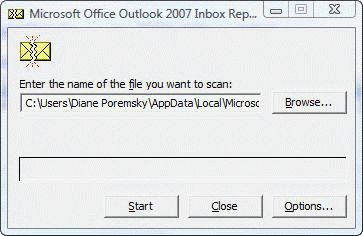
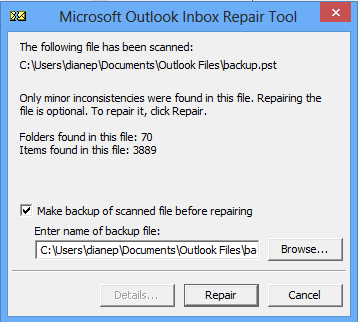
When ScanPST is finished running the tests, a dialog reports the errors found. If you need to repair the PST, always make a backup.
More Information
See the following articles for more information:
Repair a damaged Personal Folders PST file
Repair a 2gb Personal Folders file or Offline Folders
Published May 16, 2011. Last updated on May 5, 2017.