![Diane Poremsky [Outlook MVP]](http://www.outlook-tips.net/images/2014/MVP_BlueOnly.png)
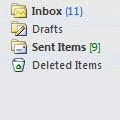
Outlook displays a number following the folder names and (in newer versions) you can choose to show the unread count or the total message count. The unread count is displayed in blue with parenthesis: (xx) and total count is displayed in green brackets: [xx].
To change which count is displayed, right click on the folder and choose Properties. Select the count to display on the General tab.
Published November 22, 2010. Last updated on June 17, 2011.