![Diane Poremsky [Outlook MVP]](http://www.outlook-tips.net/images/2014/MVP_BlueOnly.png)
We're seeing issues with Outlook staying in Offline mode and refusing to go back only. This appears to be caused by Office Communicator 2007 R2 (the precursor to Lync and Skype for Business). Exiting Communicator and restarting Outlook should fix the problem and allow Outlook to go online.
To fix, Close Outlook then exit Office Communicator completely. You'll need to check in the Task Manager, Processes tab and make sure Communicator is not running hidden. Restart Outlook and set it online.
Outlook should stay online now.
(To open Task Manger: Right click on the Windows Task Bar and choose "Start Task Manager")
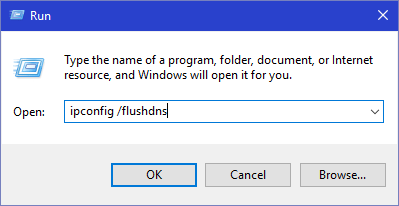
Update: if you aren't using Communicator, try flushing DNS. Windows will flush DNS if you do a repair on your network connection or you can use the command line:
ipconfig /flushdns
Type (or paste) this is the Start search field or in the Run dialog (use Windows key + R to open the Run dialog). You'll need to close and reopen Outlook.
Published August 19, 2011. Last updated on December 30, 2015.