![Diane Poremsky [Outlook MVP]](http://www.outlook-tips.net/images/2014/MVP_BlueOnly.png)
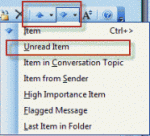
Does Outlook have a "next unread message" feature? Sure, but it's not quite as easy to use as it is in some other email programs. With a message open, you can use the blue up and down arrow buttons or keyboard shortcuts of Ctrl+> and Ctrl+< to go to the next message, read or unread. The button dropdown menus have a number of options, including one for the next unread … [Read more...] about Tip 307: Shortcuts for Reading the Next Message
Tip 306: Run Rules Later
Stephen asks: I have subscribed to and receive several automated messages (the weather etc.) on a daily basis. Returning from having been away for a few days I am faced with an inbox containing multiple messages that are no longer of any use and I just go through and delete them all. Is there any way to create a rule that will review your inbox and delete any … [Read more...] about Tip 306: Run Rules Later
Tip 305: More on Flagging BCC Messages
A question came up after my last tip about flagging messages to remind you they were sent as a BCC. Peter asked "Getting it to flag when you aren't in the To box is easy - that's a standard rule. How do you get it to flag when you are not in the CC field?" Easy - create the rule with an exception. Apply a flag to all mail after arrival except if my name is in the To or CC … [Read more...] about Tip 305: More on Flagging BCC Messages
Tip 304: BCC and Reply-to-all
Do you want to be know when you are BCC'd on a message so you don't Reply to all? For a gentle reminder, configure a Rule to set a flag on messages where you aren't in the To or Cc fields. You can even set the flag text to say "Do not reply to all" or other text of your choosing (choose the For action in a number of days option and type over 'For Follow up'). … [Read more...] about Tip 304: BCC and Reply-to-all
Tip 303: Outlook 2003 SP2
Unless you are living under a rock, you've heard that Office 2003 SP2 came out last week. Home users and those not using it in a corporation should install the update over the next week or so. If you use Microsoft Update, SP2 will be installed automatically within the next few days, if it isn't already installed. To check, go to Help, About and check the build number. It will … [Read more...] about Tip 303: Outlook 2003 SP2