![Diane Poremsky [Outlook MVP]](http://www.outlook-tips.net/images/2014/MVP_BlueOnly.png)

A reader had this question:How do I block the users I invite to my internet calendar on outlook from inviting other users? How do I keep control?Unfortunately for most users, you can't prevent invitees from forwarding invitations to others. You can request they ask permission first, and set a company policy that forbids forwarding invitations then punish users who … [Read more...] about Tip 884: Prevent users from forwarding meeting invitations?
Tip 883: Changing the Navigation Calendar fonts
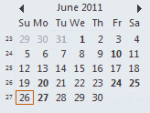
Did you know you can change the font used on the little navigation calendars on the To-do bar and Navigation pane? In Outlook 2010, go to File, Options, Calendar options and about halfway down the dialog, under Display options, is an option to change the "Date Navigator Font". In Outlook 2003 and 2007, go to Tools, Options, Other, Advanced options - look for Date … [Read more...] about Tip 883: Changing the Navigation Calendar fonts
Tip 882: Outlook 2010 default reminder time bug (Fixed)
This bug is fixed in Outlook 2010 SP1 Outlook 2010 SP1 I thought I posted this bug a long time ago but search doesn't bring it up, so here goes. If it's really a duplicate, sorry. :) When users attempt to change the Calendar's Default reminder from 15 minutes to a value of 1 day or more, the new value isn't saved. It works correctly if the reminder time is under 1 day, … [Read more...] about Tip 882: Outlook 2010 default reminder time bug (Fixed)
How to bulk move Outlook folders
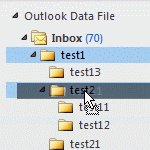
The question of how to "bulk move" folders in Microsoft Outlook comes up often and the answer is that it's surprisingly easy to do with drag and drop: select the folder and drag (or right click, drag and drop to copy the folder). If the folder contains subfolders, they (and their contents) are moved too.Drag and drop is not as quick as selecting folders and moving could be, … [Read more...] about How to bulk move Outlook folders
Tip 880: Moving an NK2 to a new profile
A reader asked: "I need to shift the NK2 file from old Exchange domain profile to a new IMAP domain profile of Google apps." That's easy (and it works for any new profile). Close Outlook then go to the folder where the new NK2 is stored (see Where are my Microsoft Outlook Files? if you need help finding it). If the Exchange NK2 is from another computer, copy it to this … [Read more...] about Tip 880: Moving an NK2 to a new profile