![Diane Poremsky [Outlook MVP]](http://www.outlook-tips.net/images/2014/MVP_BlueOnly.png)
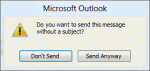
A new feature is Outlook 2010's blank subject warning: "Do you want to send this message without a subject?" When you compose a message and click Send without first filling in the subject field, the following dialog will come up, confirming that you want to send the message with a blank subject field. This was a frequently requested feature in previous … [Read more...] about Tip 879: Outlook 2010's Blank subject warning
Tip 878: Outlook dialogs don't display properly
We see questions like these each week: The Options dialog does not fit on the screen, so many of the functions remains hidden. The scroll bars are missing from the notes field in Contacts This is the result of the display settings in Windows. Either the screen resolution is set too low or the PPI percentage is set too high. In Windows 7, right click on the … [Read more...] about Tip 878: Outlook dialogs don't display properly
Tip 877: Maximum number of automatic formatting rules
Every now and again, we get asked if there is there a limit to the number of Automatic formatting rules. (Conditional Formatting in Outlook 2010)The question usually goes something like this:In Tools/Organize, you can choose a color to display a message from a specific sender when messages are received in Inbox. I'm getting the message: "You can not add another color … [Read more...] about Tip 877: Maximum number of automatic formatting rules
Tip 876: Fixed in SP1: Outlook 2010 & default IMAP accounts
Update: This hotfix is included in Outlook 2010 SP1. See Default account fix for more information and the required registry setting. The issue: When clicking on a "mailto:" on a web page or using the Send to command in other applications, Outlook opens a new email. In Outlook 2010, when the default account is an IMAP account, it uses the account assigned to the default … [Read more...] about Tip 876: Fixed in SP1: Outlook 2010 & default IMAP accounts
Tip 875: How to change the +Body style font in Outlook
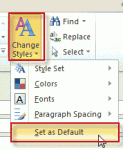
Changing the default fonts in Outlook is easy: just go into the Stationery and Fonts dialog1 and assign new fonts. The font for new mail messages is used for composing HTML email and in the notes field of calendar, contacts, and task items. ("Sticky" Notes have their own font setting.) The font for composing and reading plain text messages is also used when 'read as plain text' … [Read more...] about Tip 875: How to change the +Body style font in Outlook