![Diane Poremsky [Outlook MVP]](http://www.outlook-tips.net/images/2014/MVP_BlueOnly.png)
As I mentioned in an earlier tip, there is a bug in how Gmail handles Outlook 2010 saving sent items in the Gmail sent folder. Gmail picks up the sent item and resends it, resulting in duplicate messages being sent. The fix: disable the option to save sent items in the IMAP account. Go to File, Account Settings, double-click on the Gmail account then More Settings. On the … [Read more...] about Tip 890: Unintended consequences: GMail IMAP duplicate sent bug fix & BCC
Icons used in the Rules and Alerts dialog

A common question we are asked is "What does the hammer and wrench in the rules wizard dialog mean?" Each type of action used in rules uses an icon to identify the type action that is configured for the rule and the hammer and wrench icon are displayed for actions that don't have their own icon. The actions are (in the order shown in the Rules Wizard): Display … [Read more...] about Icons used in the Rules and Alerts dialog
Tip 887: Create a rule to delete messages after a week
When you want to delete messages after a period of time you have you have three options: Use Autoarchive Create a Rule and use Run Rules Now Use to a rules replacement tool such as Auto-Mate that runs its own rules later Autoarchive works great to delete old mail, empty deleted items, or the junk email folder. Set it to run frequently and to permanently delete … [Read more...] about Tip 887: Create a rule to delete messages after a week
Tip 886: Saving Forwarded Messages in Outlook
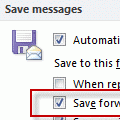
Last week we had a record number of people asking about saving copies of forwarded messages:I cannot find where the messages are that I forward. I looked in the Sent folder but don't see them there.Check your settings in Tools, Options, Email Options, Advanced email options - is Save forwarded messages enabled? (In Outlook 2010, this setting is at File, Options, Mail - … [Read more...] about Tip 886: Saving Forwarded Messages in Outlook
Tip 885: Outlook 2010 SP1 released
Office 2010 SP1 released Office 2010 SP1 was released earlier today and is available on Microsoft Update. Office 2010 SP1 contains cumulative and public updates to date for the various applications that are part of the Office suite and many previously released hotfixes for Outlook are included in SP1. To download and install, log into Microsoft Update and check for new … [Read more...] about Tip 885: Outlook 2010 SP1 released