![Diane Poremsky [Outlook MVP]](http://www.outlook-tips.net/images/2014/MVP_BlueOnly.png)
Since Outlook 2000/2002 doesn't work well on Vista, it's worth trying the calendar application that is included with Vista if you aren't interested in upgrading to Outlook 2007 and only use Outlook because you need a calendar. The only problem is getting your appointments into Calendar. Vista Calendar imports *.ics format but Outlook 2003 and earlier can't export to a single … [Read more...] about Export Outlook Calendar to use in Windows 7 or Vista
calendar
Calendar Detail View in Outlook
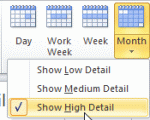
We’re getting some questions from users whose appointments are not visible on the Month view but their all day events are visible and they can see all appointments on the Day or Week views. If this happens to you, check the Detail level. (If you are missing all day events too or aren't visible on the Day and Week views, it's not your Details setting.) Outlook 2007 and 2010 … [Read more...] about Calendar Detail View in Outlook
Tip 859: Remove Duplicate Holidays from the Outlook Calendar

We’ve all done it once or twice: accidentally added Holidays twice or duplicated them when syncing with a smart phone. Or, you added holidays for more than one country and decided you didn’t need all of those countries. Fortunately, they aren’t hard to remove and you don’t have to do it one at a time.Use a List view and group by category.Delete all then re-add the Holidays. … [Read more...] about Tip 859: Remove Duplicate Holidays from the Outlook Calendar
Tip 847: March Madness Calendars
It's that time of year again, when college basketball takes over the airwaves and the water cooler. To make it easier for fans to follow the games, fans can subscribe to calendars using Outlook 2007/2010, Apple, and any calendar application that supports icalendars (ical) or the webcal protocol. So far this year, I'm aware of just two March Madness calendar - from Calendar … [Read more...] about Tip 847: March Madness Calendars
Create a custom view to list upcoming birthdays
To display only the birthdays that occur in the upcoming months, you need to create a custom view. However, if you try to do it by the start date, you won't get the results you expect. Instead, you need to create a filtered table view that only shows items in the Birthday category and with a recurrence containing the names of the month. Separate each month with a comma, so the … [Read more...] about Create a custom view to list upcoming birthdays