![Diane Poremsky [Outlook MVP]](http://www.outlook-tips.net/images/2014/MVP_BlueOnly.png)
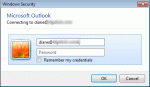
If you are receiving this error with AT&T or a Yahoo account, "L Tyler" suggests changing the POP and SMTP servers to the following names to put an end to the dialog. Incoming Mail Server: pop.mail.yahoo.com - Use Port 465 and SSL Outgoing Mail Server: smtp.mail.yahoo.com - Use Port 995, SSL and authenticate with the outgoing server AT&T changed their mail server names to … [Read more...] about Tip 918: Persistent Network Password Dialog
outlook
Tip 916: Using Additional Addresses with Hotmail Live
Hotmail allows you to configure additional addresses in your account, and you can set one as the default for new messages and replies. Alternatively, you can choose which address is used for replies. When you have more than one email account, you can have all mail delivered to a Hotmail account and reply from the additional addresses. An Outlook user had a question about … [Read more...] about Tip 916: Using Additional Addresses with Hotmail Live
Tip 904: Outlook is Stuck Offline
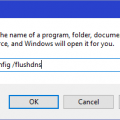
We're seeing issues with Outlook staying in Offline mode and refusing to go back only. This appears to be caused by Office Communicator 2007 R2 (the precursor to Lync and Skype for Business). Exiting Communicator and restarting Outlook should fix the problem and allow Outlook to go online.To fix, Close Outlook then exit Office Communicator completely. You'll need … [Read more...] about Tip 904: Outlook is Stuck Offline
Tip 899: All Time Zones are not created equal
I helped several people over the last two weeks whose appointments were off by an hour or two. This is almost always the result of using the wrong time zone or daylight time setting. In each case, the users lived in an area that does not honor daylight saving time, but they used a time zone with the correct offset then unchecked the option to automatically adjust for … [Read more...] about Tip 899: All Time Zones are not created equal
550 5.7.1 Relaying denied: You must check for new mail before sending mail.
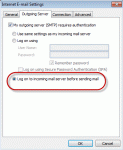
If you receive this error message: 550 5.7. < alias@domain.com >... Relaying denied: You must check for new mail before sending mail. You need to configure Outlook to check for new mail before sending mail. Lowering your "check every xx minutes" time to 8 minutes or disabling Send Immediately may reduce the frequency of this error message. This error occurs because … [Read more...] about 550 5.7.1 Relaying denied: You must check for new mail before sending mail.