![Diane Poremsky [Outlook MVP]](http://www.outlook-tips.net/images/2014/MVP_BlueOnly.png)
Windows default behavior of hiding file extensions seems to confuse some users when they try to save an attachment they received by email. They think it will be saved without the extension because the Save dialog has “All files” in the Save as file type field and they can’t select a new file type. No need to worry though, the file will be saved using the extension it uses in … [Read more...] about Tip 490: Save... File Extensions
Tips Archive
Tip 489: Insert as Text
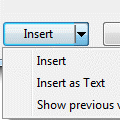
An Outlook user is trying to insert a Word document into an email, but Outlook wants to attach it to the email instead of being inserted into the message body as text.If all else fails, he could open the document and use copy and paste, but that’s not necessary. After selecting the document in the Insert dialog, click the little arrow on the Insert button and choose Insert … [Read more...] about Tip 489: Insert as Text
Tip 488: Accept Email Only From People You Know
An Outlook user asks “Is there some way to configure Outlook where the only emails that come to my inbox are from those people in my address book and messages from people not in my address book go to a "trash" folder for me to look at later?” Yes, you can filter email from people in your address book and place all other messages in a junk email folder. It's one of the junk … [Read more...] about Tip 488: Accept Email Only From People You Know
Tip 487: Turn Navigation Pane and To-Do Bar off and on
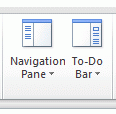
In Outlook 2007 and Outlook 2010, you can use Alt+F1 to toggle the Navigation pane and Alt+F2 to toggle the To-do bar. The panes roll between Minimized, Off, and Normaleach time you press the key combination.In Outlook 2013, Alt+F1 will roll through the Navigation pane layout: Off, Minimized, and Normal. Outlook 2013 does not have a To-do bar and the shortcuts do not work … [Read more...] about Tip 487: Turn Navigation Pane and To-Do Bar off and on
Tip 486: Flashing Office Orb
I thought I covered this tip last fall but can’t find it in the archives, so here it is. If it’s a repeat, sorry. For some reason, a lot of new Office 2007 users have a hard time figuring out how to save documents. It happens too often to pass it off as a user problem. A few can’t figure out how to stop the annoying flashing icon. I’m convinced its not a “user problem” but a … [Read more...] about Tip 486: Flashing Office Orb