![Diane Poremsky [Outlook MVP]](http://www.outlook-tips.net/images/2014/MVP_BlueOnly.png)

Tip 104: Changing SMTP Servers Do you need to use different SMTP servers depending on how you connect to the Internet? Rather than constantly editing the account properties, create a new account using the other SMTP server. While this works well for two SMTP servers, giving you Account A - SMTP 1, Account B - SMTP 1, Account A - SMTP 2, Account B - SMTP 2, it can get … [Read more...] about Changing SMTP Servers
Tips Archive
Tip 103: QuickIcons
Last week I told you about a cool utility for Outlook called Knockout. The same site has another nice utility for anyone who wants shortcuts to Outlook's standard forms on their QuickLaunch bar but doesn't want to create them. It's called QuickIcons and that's what it does - quickly create the icons for you. Once created, you can move or copy them to your desktop or … [Read more...] about Tip 103: QuickIcons
Tip 100: Outlook 2003 and Forms Cache Corruption

If you use Outlook 2003 and custom forms you've probably discovered the hard way that it has a problem with a corrupt forms cache. The recommended solution is a batch file to delete the cache. A hotfix is available to fix the forms cache corruption in Public Folder Favorites (and other issues); as usual you'll need to call PPS to get it. (We're waiting on a fix for other forms … [Read more...] about Tip 100: Outlook 2003 and Forms Cache Corruption
Tip 99: What is Auto-Resolve and Auto-Complete?
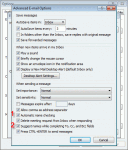
All versions of Outlook support Auto-resolve. Also known as automatic name checking, this feature allows you to type a name, or even just the first few letters, and the name resolves a few seconds after you tab out of the field. When one match is found, the name has a solid underline. When more than one possible match exist you’ll see a red wavy underline. Right click on it to … [Read more...] about Tip 99: What is Auto-Resolve and Auto-Complete?
Tip 98: PocketKnife Peek
One of the best freeware utilities available for Outlook has just gotten better. PocketKnife Peek makes it easy to view message headers and source. It now supports reply in plain text and view attachment information, including names (with extra spaces removed) and file sizes of attachments sent in zips. Other features of PocketKnife Peek include Reply to some, which presents … [Read more...] about Tip 98: PocketKnife Peek