![Diane Poremsky [Outlook MVP]](http://www.outlook-tips.net/images/2014/MVP_BlueOnly.png)

I've heard a lot of complaints from users over Outlook's poor handling of recurring appointments and meetings over the years, especially when it comes to ending a series early.At least Outlook warns you before you do something stupid:Exceptions occur either when you move an occurrence to another time or date or when you edit an occurrence.The recommended … [Read more...] about Tip 991: Ending a recurring series of appointments and keeping the exceptions
Tips Archive
Tip 990: Appointments appear to be longer than scheduled
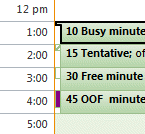
When you view Outlook's day or week calendar using a time scale larger than the appointment time (such as 30 minute appointments in a one hour time scale) the appointments will fill the entire time period and at first glance, are longer than they should be and may overlap. However if you look closer you'll see a small "pan handle" that indicates the true length of the … [Read more...] about Tip 990: Appointments appear to be longer than scheduled
Tip 989: Change the Calendar Publishing LiveID Account

When you publish a calendar to Office Online using Outlook 2007 and up, your LiveID is saved by Outlook for automatic publishing of updates. If you want to change the LiveID you are using to publish, go to Account Settings > Published Calendars and delete the calendars published under the old LiveID, then click the Change Account button and sign out of the LiveID account and … [Read more...] about Tip 989: Change the Calendar Publishing LiveID Account
Tip 988: View a Sender's Free/Busy in Outlook

Can you view someone's calendar from an email you have received? Currently, I switch to Calendar view and then open up their calendar. Is there an easier way? Sure, there is an easier way. Right click on the sender's name (or any recipient) and choose Schedule a Meeting. This opens a Meeting Request to the Scheduling Assistant page, with the selected person's address and … [Read more...] about Tip 988: View a Sender's Free/Busy in Outlook
Tip 987: Tracking Attendees on Outlook Meeting Invitations

When an invitee does not return a meeting response or the response does not process and update the tracking results, you can manually update the meeting. To do this, open the meeting request and switch to the tracking page. Click in the Response field for one of the attendees and select the desired response. Note: the response field is not editable for the … [Read more...] about Tip 987: Tracking Attendees on Outlook Meeting Invitations