• Skip to main content
  • Skip to primary sidebar
  • Skip to footer

Outlook Tips

Learning Microsoft Outlook One Tip At A Time

Diane Poremsky [Outlook MVP]

  • Home
  • Tips Archive
  • How to...
  • Beginner
  • Outlook.com

Tip 689: Automatic Underlines

This is really a Word problem and since Word is also the Outlook email editor, I’ll mention this handy (and sometimes annoying) feature.

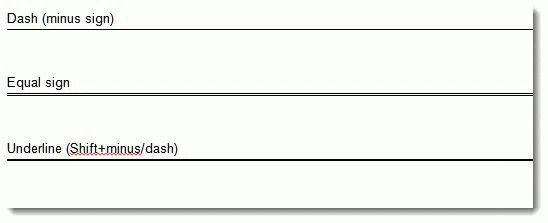
A user asked: "When typing ==== then hitting return, Outlook puts in a double line. This line cannot be selected, formatted, or deleted. Turning borders off moves the line. Selecting all text before and after and hitting delete moves the line. "

This is an Automatic formatting option in Word. Along with double underlines, it also inserts full lines for dashes (—) and underscores ( ___ ) anytime you type the character three times in a row then press Enter.

If you hit Ctrl+Z as soon as it changes, it will undo the line. To disable this feature, go to Tools, Options, Spelling tab, Autocorrect options. It’s controlled by the Autoformat as you type tab – Border lines option.
Automatic Underlines (borders) in Email

Published December 18, 2009. Last updated on October 31, 2011.
Share this:

  • Twitter
  • Facebook
  • LinkedIn
  • More
  • Print
  • Tumblr
  • Reddit
  • Pocket
  • Pinterest

Related posts:

You can use extended characters in your messages by copying or dragging them from the Windows character map to a message. Open theTip 32: Using Extended Characters spell check email subjectTip 407: Spell Check the Subject Line Disable Ctrl+Enter for Send MessagePrevent Accidentally Sending an Email Message Change the autocomplete and autoresolve settingsTip 99: What is Auto-Resolve and Auto-Complete?
Subscribe
Notify of
0 Comments
Newest
Oldest Most Voted
Inline Feedbacks
View all comments

Primary Sidebar

Search OutlookTips

Training and one-on-one assistance

Do you need help setting up Outlook or want some one-on-one training? I'm available for hire. See Training and one-on-one assistance for fees and to check availability.

All-Time Most Popular Posts

  • Windows 7 and Vista Start Search field
    How to start Outlook in safe mode
  • outlook.com icon
    Delete a message stuck in Outlook's Outbox
  • How to use Outlook's Command line switches
  • Use Cleanviews switch to reset all views
    How to Reset the View on Outlook folders
  • Where are my Outlook Files?
  • Folder paths
    How to Find Folder Paths in Outlook Mailboxes
  • How to use Scanpst.exe to repair Outlook data files
  • Outlook's Missing Holidays
  • backstage page
    Where is File tab in Outlook?
  • Icons found in the Inbox, Message Headers, and Toolbars

Footer

Recent Posts

  • Log into multiple Outlook on the web accounts
  • Keeping Hackers out of Microsoft accounts
  • Microsoft Account Closure Email
  • Outlook on the web Quick Actions moved to the right
  • Automatically sign out of Outlook.com

Recent Bug List

Microsoft keeps a running list of issues affecting recently released updates at Fixes or workarounds for recent issues in Outlook for Windows.

Office Update History

Update history for supported Office versions is at Update history for Office

Resources

Ask questions and share your knowledge in Outlook Forums.

You Might Like

Where is File tab in Outlook?
Using Two-factor authentication
Where are my Outlook Files?
How to use Outlook's Command line switches

© 2003–2026 · Outlook Tips

wpDiscuz
You are going to send email to

Move Comment