What if you used the last tip to dismiss reminders and discover you needed some of the reminders left on?
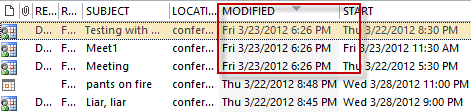
Unfortunately, Outlook doesn't have an easy way of showing you what reminders were dismissed. You can create a view that includes the modified field, then sort or filter by it to see when the items were dismissed. It's not 100% accurate as many things can modify the item, but if you do this soon after dismissing the reminders, it should be 100% accurate.
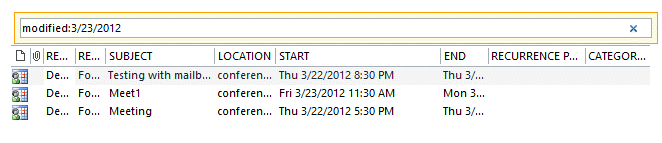
You can also use Instant Search in Outlook 2007 or Outlook 2010. Use modified:date format in the search field.
Published Dec 3 2004
Related posts:
« « Tip 208: Dismissing RemindersTip 210: Printing Calendars from Public Folders » »


Hi there
I accidentally deleted two items in Outlook 2007 that were created many months ago (not sure exactly when the items were created). But I accidentally dismissed the reminder for these calendar items.
I keep searching for tips on how to retrieve those reminders and keep landing on this page.
But I must admit, I don’t know how to apply your advice:
“You can create a view that includes the modified field, then sort or filter by it to see when the items were dismissed.”
How do I do this in Outlook 2007?
thanks
Dale
If not in a list view, switch to a list view (the Inbox is a list view, By Category is a list view as is All appointments.)
right click on the row of field names and choose Field choose
Find the Modified field under Date and time fields and drag it to the row of field names.
Click on it it sort… if you know when you dismissed the reminder, find the items with the same modified date or date and time.
Worked perfectly. Thank you. Appointments Retrieved.
This worked wonderfully! Thanks for the topic AND the followup advice!